


GLM 4.7 is Ready





 AI Chat
 AI Image
 AI Writing
 AI Study
 AI Work
 AI Translate






One Platform. Multiple AI Models.
Meet, chat, and create with leading AI models like GPT 6 Luna, Claude Haiku 5.5, Grok-4.1 Fast and more — all in a single, simple platform.



Trusted by millions of users worldwide




GLM-4.7: An AI Agent Built for Complex Tasks
GLM-4.7 is a powerful model from Z.ai designed for coding, complex reasoning, content creation, and agent-based workflows. On ChatGoat AI Agent, you can use GLM-4.7 to debug code, analyze documents, conduct research, create content, and turn complex goals into manageable steps without switching between multiple AI platforms.
Write, Debug, and Improve Code
Use GLM-4.7 to generate code, explain technical concepts, identify errors, refactor functions, and suggest implementation plans. For larger development tasks, ask it to break requirements into steps, generate the necessary code, and review the result for potential issues.
Complete Multi-Step Agent Tasks
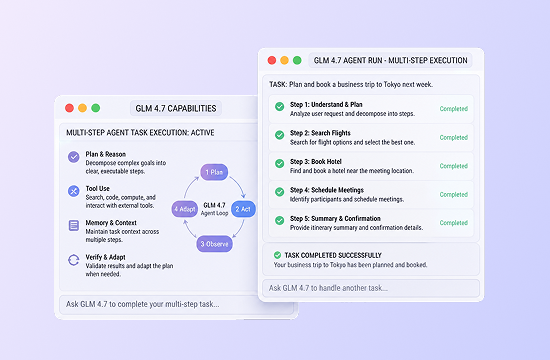
GLM-4.7 can go beyond answering isolated questions. Give it a goal, relevant context, and clear constraints, and it can help plan the workflow, organize information, complete intermediate steps, and refine the final output through follow-up instructions.
Solve Complex Problems with Structured Reasoning
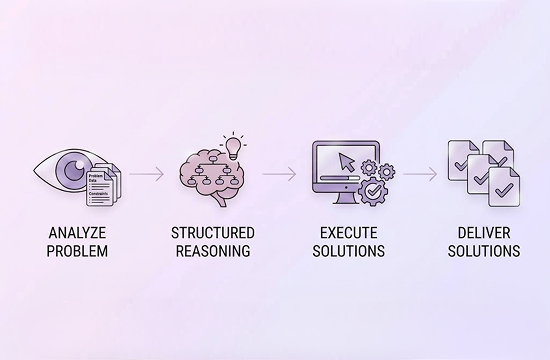
When a task requires comparison, evaluation, or multi-step analysis, GLM-4.7 can organize the available information and produce a structured response. Ask it to explain assumptions, compare options, identify missing details, or present recommendations with supporting reasons.
Create, Rewrite, and Translate Content
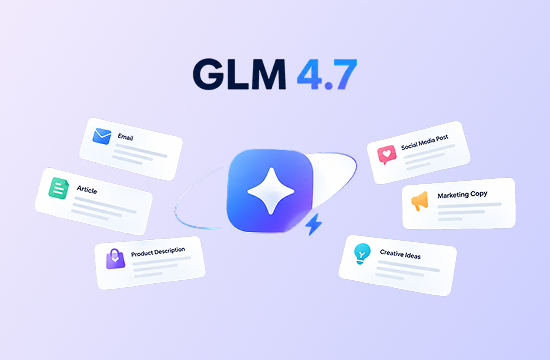
Create emails, articles, product descriptions, social media posts, marketing copy, and creative ideas with GLM-4.7. Specify your audience, preferred tone, length, and format, then use follow-up prompts to rewrite, shorten, expand, translate, or polish the result.
Analyze Documents and Organize Information
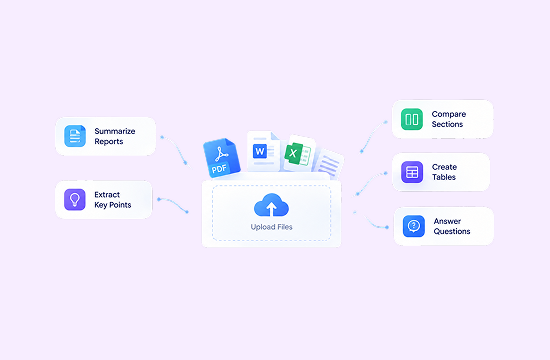
Upload supported files and ask GLM-4.7 to summarize reports, extract key points, compare sections, create tables, or answer questions based on source material. For long documents, begin with an outline and key findings before exploring individual sections in more detail.
Why Choose GLM-4.7 on ChatGoat AI Agent?
ChatGoat AI Agent gives you a convenient way to use GLM-4.7 for coding, research, writing, document analysis, and multi-step tasks. Work with GLM-4.7 alongside other leading AI models in one streamlined workspace.

Access Multiple AI Models in One Workspace
Use GLM-4.7 alongside GPT, Claude, Gemini, Qwen, and other leading models. Switch between models based on your task and compare their outputs without opening separate applications or managing multiple accounts.

Move from Conversation to Execution
ChatGoat AI Agent is designed for more than one-time questions. Provide your objective, background, and requirements, then work with GLM-4.7 to plan the task, produce intermediate results, and improve the final answer through multiple steps.

Work with Text, Files, and Images
In addition to standard AI chat, ChatGoat AI lets you paste long text and upload supported documents or images. Use GLM-4.7 to summarize content, extract information, explain materials, and transform unstructured data into useful outputs.

Review and Refine Results More Easily
Complex tasks rarely produce a perfect result on the first attempt. Ask GLM-4.7 to create a checklist, flag uncertain information, show its task plan, or revise the response using your feedback. This makes it easier to identify omissions and improve output quality.
How to Use GLM-4.7 on ChatGoat AI
How can you use GLM-4.7 for coding, document analysis, writing, and multi-step AI Agent tasks on ChatGoat AI? Follow these three steps.
Step 1: Select GLM-4.7
Open ChatGoat AI Agent, click the model menu, and select GLM-4.7 from the available models.

Step 2: Enter Your Goal or Upload a File
Describe what you want to accomplish and include any relevant context, formatting rules, audience details, or limitations. You can also upload a supported document or image for analysis.
Step 3: Review and Refine the Result
Check the response, then use follow-up prompts to improve it. For complex tasks, ask GLM-4.7 to explain the steps, identify information that needs verification, or return the answer in a specific format.
Try GLM-4.7 on ChatGoat AI Agent
Start using GLM-4.7 on ChatGoat AI Agent today. Whether you need to debug code, summarize documents, plan a project, create content, or complete a complex research task, simply describe your goal and let GLM-4.7 help turn it into clear, actionable results.
Why Users Love GLM-4.7
Why Users Love GLM-4.7
I gave GLM-4.7 a development request covering several modules and asked it to plan the work before generating code. The structured workflow made the result much easier to review and modify.

I gave GLM-4.7 a development request covering several modules and asked it to plan the work before generating code. The structured workflow made the result much easier to review and modify.
For long documents, I ask it to extract the structure and main findings first. I can then explore individual sections without repeatedly searching through the original file.

For long documents, I ask it to extract the structure and main findings first. I can then explore individual sections without repeatedly searching through the original file.
I regularly use it to rewrite product copy and business emails. When I provide the audience, tone, and word count, the first draft is usually close to what I need.

I regularly use it to rewrite product copy and business emails. When I provide the audience, tone, and word count, the first draft is usually close to what I need.
GLM-4.7 does more than suggest a quick code fix. It can explain the cause of an error and point out other areas of the project that may be affected.

GLM-4.7 does more than suggest a quick code fix. It can explain the cause of an error and point out other areas of the project that may be affected.
Being able to compare GLM-4.7 with other models in ChatGoat AI is extremely useful. I can choose one model for quick drafting and another for deeper analysis.

Being able to compare GLM-4.7 with other models in ChatGoat AI is extremely useful. I can choose one model for quick drafting and another for deeper analysis.
It is especially useful for turning an unclear idea into practical steps. Asking it to plan first and complete the task one stage at a time gives me more reliable results.

It is especially useful for turning an unclear idea into practical steps. Asking it to plan first and complete the task one stage at a time gives me more reliable results.
GLM-4.7 FAQ
Everything you need to know about GLM-4.7
What is GLM-4.7?

What can I use GLM-4.7 for?
Can GLM-4.7 help with coding?
Can GLM-4.7 analyze and debug my code?
Can GLM-4.7 analyze files and images?
Can GLM-4.7 complete AI Agent tasks?
How is GLM-4.7 different from other AI models?
How can I get better results from GLM-4.7?
Does GLM-4.7 replace professional review?