Key Takeaways
- GPT Image 2.6 introduces two API variants: Flare and Sunburst. Flare focuses on fast image generation and everyday creative tasks, while Sunburst is designed for higher-quality visuals, detailed work, and more consistent editing.
- GPT Image 2.6 brings several important new features. These include native GIF generation, SVG export through the API, image markup for targeted edits, and a complexity control for handling simple or demanding visual tasks. OpenAI also reports image generation speeds up to 50% faster than before.
- Choose GPT Image 2.6 Flare for speed. It is suitable for social media graphics, marketing drafts, product variations, and workflows that require frequent image generation. Under low-quality settings, it can generate images in as little as six seconds.
- Choose GPT Image 2.6 Sunburst for quality and precision. It is a better fit for detailed product photography, professional marketing visuals, complex compositions, and editing tasks where important details need to remain consistent.
- Choose GPT Image 2.5 for everyday image creation. It remains a capable option for realistic images, natural lighting, rich textures, reference preservation, and multi-turn editing.
- Choose Nano Banana 2.1 for reference-based creative workflows. It is worth trying when you need to work with multiple reference images, edit characters and objects, or create infographics and visual designs.
The quick recommendation: GPT Image 2.6 Flare for speed, GPT Image 2.6 Sunburst for detail and precision, GPT Image 2.5 for everyday image creation, and Nano Banana 2.1 for reference-driven editing.

GPT Image 2.6 vs GPT Image 2.5 vs Nano Banana 2.1: Key Differences
Before looking at individual features, here is a quick overview of the four options.
| Model | Main Strength | Best For |
|---|---|---|
| GPT Image 2.6 Flare | Fast image generation | Social graphics, drafts, product variations |
| GPT Image 2.6 Sunburst | Detail and editing precision | Professional visuals, complex compositions |
| GPT Image 2.5 | Reliable image generation and editing | Everyday creative work |
| Nano Banana 2.1 | Reference-based editing | Character consistency, multi-image workflows |
The main difference is not simply which model produces the most attractive image. It is how well each model handles different creative tasks.
GPT Image 2.6 gives users more control over generation and export workflows. GPT Image 2.5 remains useful for general image creation, while Nano Banana 2.1 offers another option for reference-driven editing and visual design.
What Is New in GPT Image 2.6?
GPT Image 2.6 is more than a routine image-generation update. It introduces several features that make the model useful for more advanced creative workflows.
Two Model Variants: Flare and Sunburst
One of the most important things to understand is that GPT Image 2.6 has two API variants.
GPT Image 2.6 Flare is optimized for speed and efficiency. It is suitable for users who want to generate images quickly, test different ideas, and create multiple visual variations.
GPT Image 2.6 Sunburst is the base model and focuses more on image detail, quality, and precision. It is better suited to complex visual tasks and editing workflows where consistency matters.
The two variants give developers and users more flexibility. Instead of using the same model for every task, they can select a version that matches their priorities.
Native GIF Generation
One of the most noticeable additions is native animated GIF generation. Traditional AI image tools mainly focus on producing static images. With GIF generation, GPT Image 2.6 can create short animated visual content from a prompt. This opens up more possibilities for reaction images, animated mascots, social media content, simple storyboards, and promotional materials.
For example, a user can describe a cute mascot waving, blinking, or jumping. The model can generate an animated GIF instead of requiring the user to create every frame manually.
Supports SVG Export
GPT Image 2.6 also introduces SVG output support. SVG is a vector format that can be resized without losing sharpness. This makes it useful for logos, icons, diagrams, simple illustrations, and other graphics that may need to be edited later.
Unlike ordinary raster images, SVG graphics contain editable vector elements such as paths, shapes, and colors. This feature is especially useful for design workflows where users need more flexibility after generation. It is important to note that SVG output is an API capability. Users should check whether the specific platform they are using exposes this export option.
Image Markup for More Precise Editing
Another useful feature is image markup. Instead of describing an entire image and hoping the model understands which area should change, users can indicate a specific region for editing.
For example, imagine a product photo with a blue background. You want to change only the background to white while keeping the product, lighting, and camera angle unchanged. Markup-guided editing can make this kind of targeted instruction easier to communicate. It is particularly useful for product photography, advertising graphics, and image correction.
Complexity Control
GPT Image 2.6 introduces a complexity parameter with low, medium, and high settings. This setting controls how much planning the model applies to a task. Low complexity is useful for simple requests and quick edits. Medium complexity provides a balance for common creative work. High complexity is more suitable for detailed scenes, complicated layouts, and prompts that require the model to handle many visual relationships.
Complexity is different from image quality. Increasing complexity does not automatically mean a higher-resolution image. It changes how much reasoning and planning the model applies to the task.
Faster Image Generation
OpenAI reports that GPT Image 2.6 generates images up to 50% faster than before. The Flare variant is especially focused on speed. Under low-quality settings, OpenAI reports that it can generate an image in as little as six seconds. Actual generation time still depends on the prompt, image dimensions, quality settings, server conditions, and platform implementation.
GPT Image 2.6 vs GPT Image 2.5 vs Nano Banana 2.1: Feature Comparison
The following table summarizes the main capabilities of the models.
| Feature | GPT Image 2.6 | GPT Image 2.5 | Nano Banana 2.1 |
|---|---|---|---|
| Text-to-image | Yes | Yes | Yes |
| Image editing | Yes | Yes | Yes |
| Reference image workflows | Yes | Yes | Yes |
| Multi-turn editing | Yes | Yes | Yes |
| Native GIF generation | Yes, API | No equivalent new GIF workflow | No equivalent native GIF feature |
| SVG output | Yes, API | No equivalent new SVG workflow | No equivalent native SVG feature |
| Targeted markup editing | Yes | No equivalent new markup workflow | Different editing workflow |
| Complexity control | Yes | No equivalent new control | Different model controls |
| Main strength | New creative controls | General image creation | Reference-based visual workflows |
The table focuses on the documented model capabilities, not every possible feature exposed by third-party platforms.
Image Quality: Which Model Produces Better Results?
Image quality is not one single measurement. A model may generate realistic product photography but struggle with small text. Another may handle reference images well but produce less consistent details in a complicated scene.
To make a useful comparison, it is better to evaluate several different image-generation tasks.
Realistic Product Photography
Product photography requires accurate shapes, realistic materials, natural shadows, and professional lighting.
GPT Image 2.6 Sunburst is worth testing when the final image needs detailed materials and precise visual presentation. GPT Image 2.5 is also a strong candidate for realistic everyday product visuals.
Flare is useful for creating quick concepts and variations. Nano Banana 2.1 can be tested when a reference product image needs to guide the output.
Test Prompt:
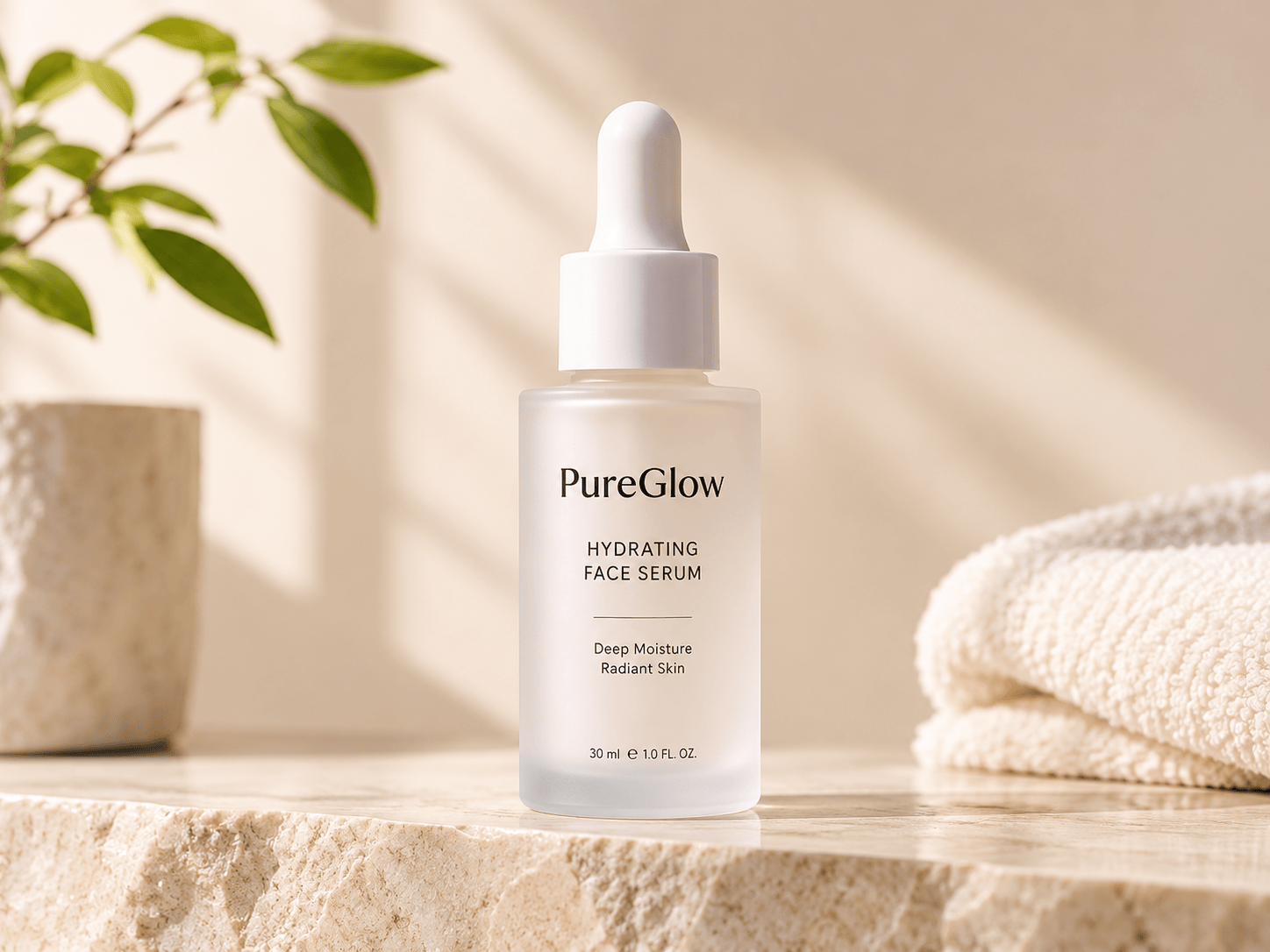
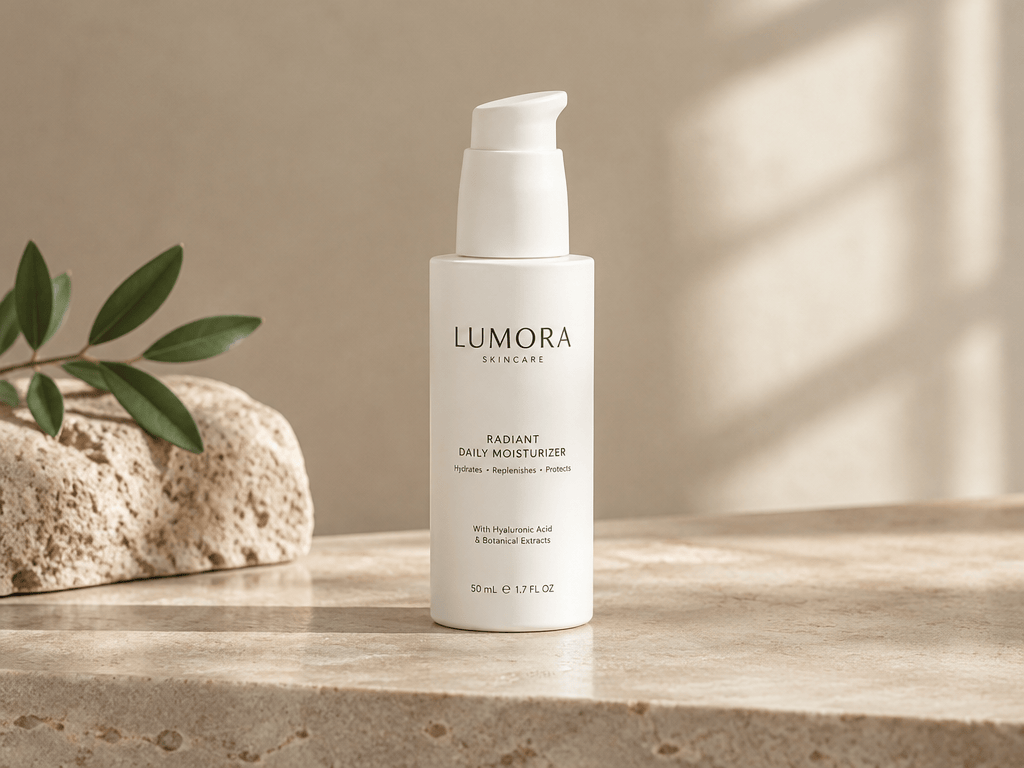
"Create a premium commercial product photograph of a minimalist white skincare bottle on a beige stone surface. Use soft natural window lighting, realistic shadows, subtle reflections, and a clean luxury advertising style. Keep the product label sharp and the composition simple."
GPT Image 2.6:
GPT Image 2.5:
Nano Banana 2.1:
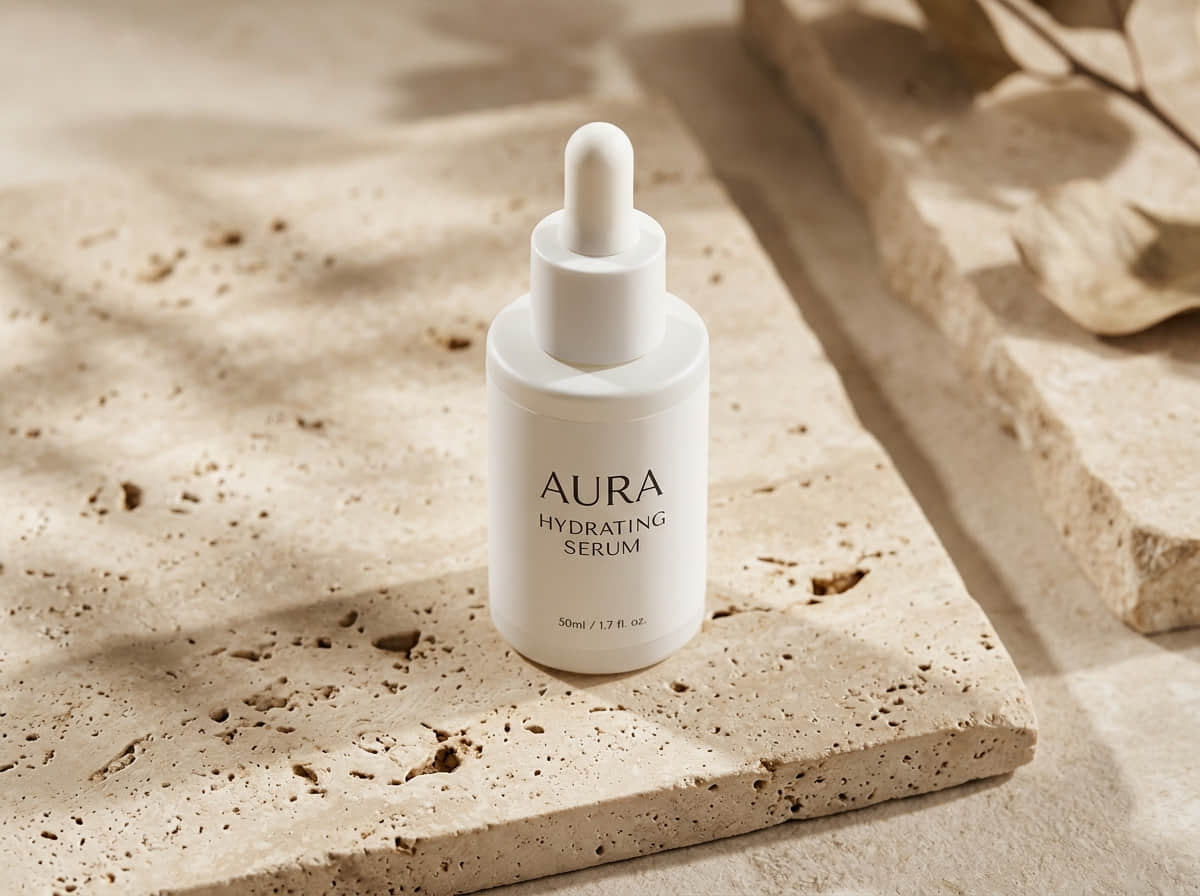
Evaluate the models based on product shape, label accuracy, lighting, material realism, and background quality.
Posters and Text Rendering
Generating images with readable text is one of the more demanding image-generation tasks.
A poster may look visually attractive but still be unusable if the headline contains spelling errors or the text layout is inconsistent.
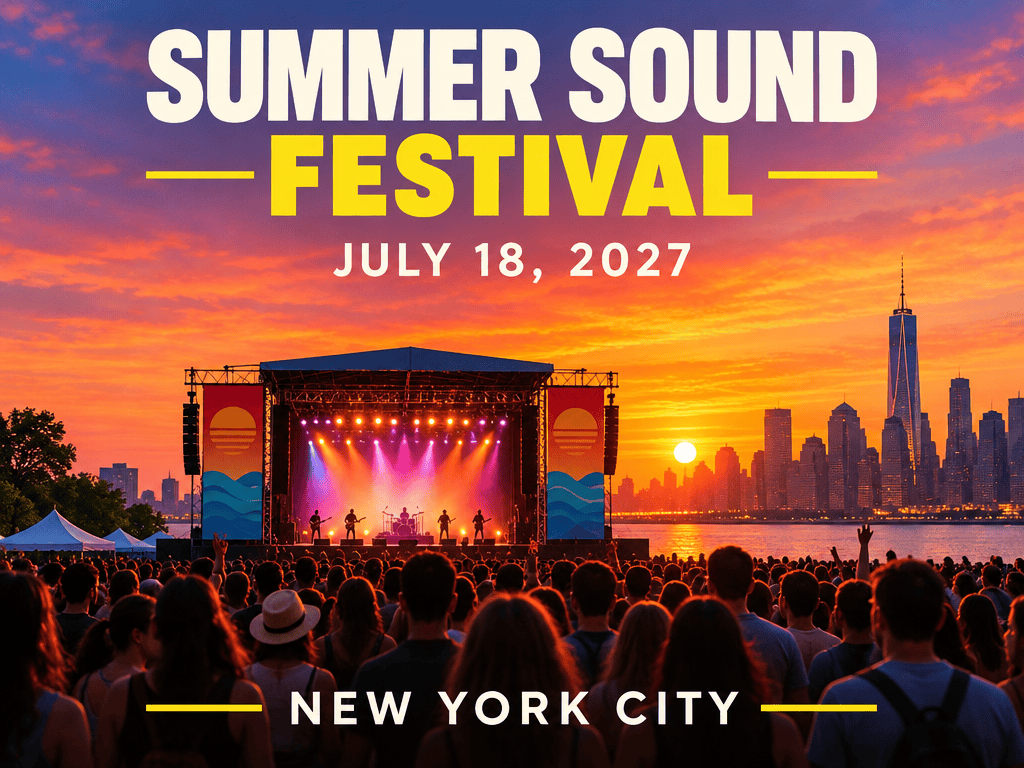
Test Prompt:
"Design a modern summer music festival poster. Add the exact headline 'SUMMER SOUND FESTIVAL' at the top, the date 'JULY 18, 2027' below it, and the location 'NEW YORK CITY' at the bottom. Use bold typography, a vibrant sunset background, and a clean editorial layout. Keep all text correctly spelled and clearly readable."
GPT Image 2.6:

GPT Image 2.5:
Nano Banana 2.1:
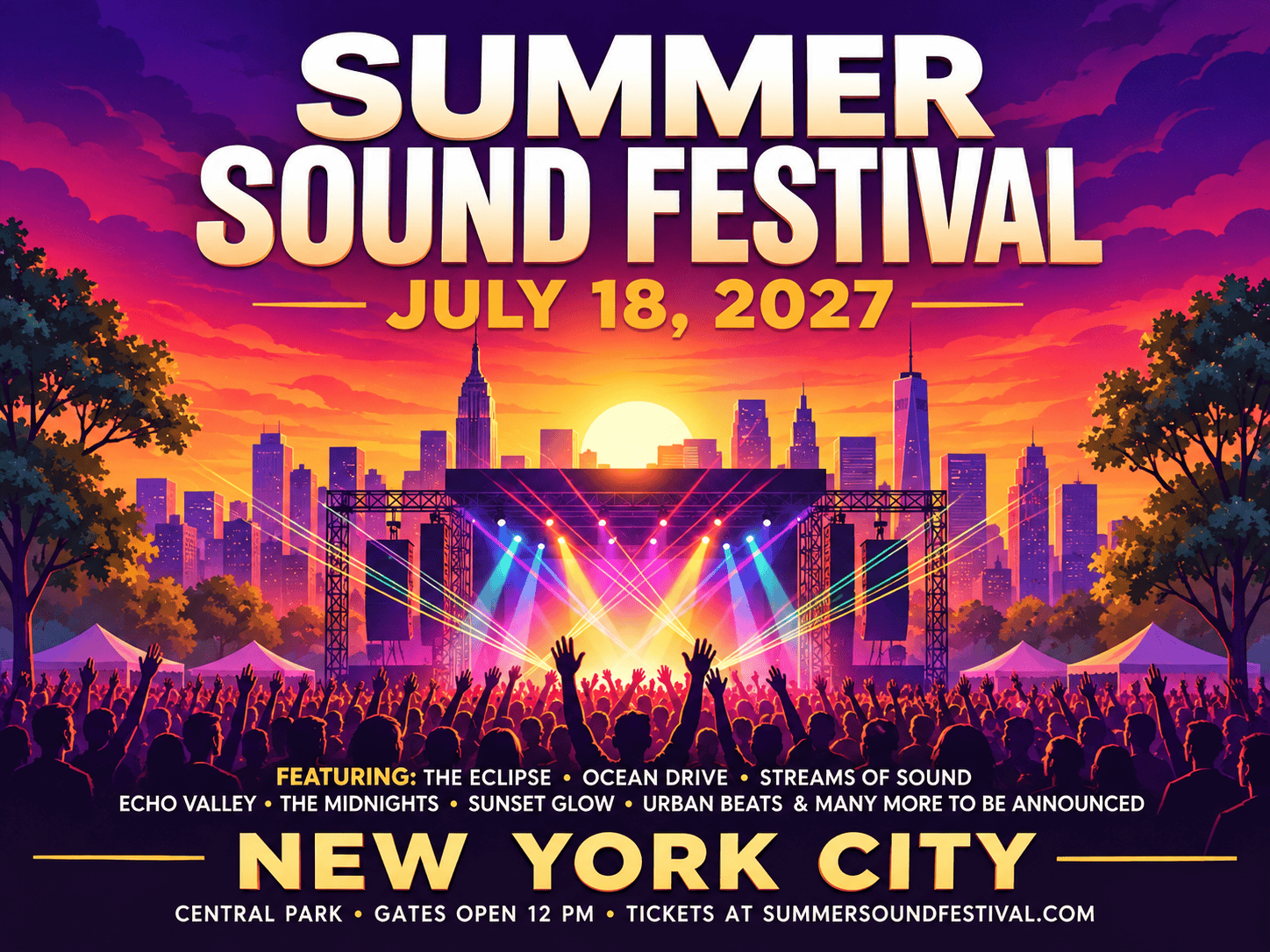
Compare the spelling, letter shapes, text placement, spacing, and overall design hierarchy.
Character Consistency
Character consistency matters when creating comic panels, story illustrations, game concepts, and social media characters.
The model should preserve facial features, clothing, hairstyle, body proportions, and other identifying visual details across multiple images.
Test Prompt:
"Create a character reference sheet for a young female fantasy explorer with short silver hair, green eyes, a brown leather jacket, and a small red backpack. Show the same character from the front, side, and back. Keep her facial features, clothing, hairstyle, and proportions consistent in every view."
Nano Banana 2.1 is worth evaluating for reference-driven character workflows. GPT Image 2.6 Sunburst is another option when precise editing and consistency across multiple rounds are important.
Infographic Generation
Infographics combine text, icons, charts, and structured layouts. They require more than attractive image generation.
Test Prompt:
"Create a clean educational infographic explaining the water cycle. Include four stages: evaporation, condensation, precipitation, and collection. Use simple illustrations, clear arrows, readable labels, and a balanced blue-and-white color palette. Arrange the information in a logical circular layout."
Evaluate whether the model can organize information clearly, keep labels readable, and maintain a logical visual hierarchy.
Image Editing
Image editing is different from generating an image from scratch. The model needs to understand the original image and change only the requested elements.
Upload the same source image to each model and use the following prompt:
"Change the background of this product photo to a clean white studio background. Keep the product's original shape, color, logo, proportions, and surface details unchanged. Do not add any new objects. Preserve the original camera angle and lighting direction."
Look at whether the model preserves the original product, follows the editing instruction, and avoids changing unrelated details.
Complex Scene Composition
A complex scene may contain multiple people, objects, lighting conditions, and spatial relationships.
Test Prompt:
"Create a cinematic photograph of a small outdoor coffee shop on a rainy city street at night. Show two customers sitting near the window, a barista preparing coffee inside, a bicycle parked beside the entrance, and warm light reflecting on the wet pavement. Use realistic proportions, natural reflections, and a balanced composition."
Compare object placement, perspective, lighting, scene coherence, and the accuracy of individual details.
GIF and SVG Export
This test is especially important for GPT Image 2.6 because its new export capabilities make it different from the other models.
GIF Test Prompt:
"Create a short animated GIF of a cute orange cat sitting on a desk, blinking, moving its tail, and gently waving one paw. Keep the character's appearance and background consistent throughout the animation."
SVG Test Prompt:
"Create a simple flat vector illustration of a green leaf with a clean outline and three visible veins. Use a minimal design, solid colors, and editable vector shapes. Avoid gradients and unnecessary details."
Check whether the output is a genuine animated GIF or editable SVG file rather than a static image with a different file extension.
Note that SVG generation is supported through the GPT Image 2.6 API. Availability depends on the interface or platform you use.
Image Generation Speed Comparison
Generation speed affects how efficiently users can work, especially when they need to test several prompts or produce many images.
GPT Image 2.6 places a strong emphasis on faster generation. OpenAI reports that it is up to 50% faster than before, and the Flare variant can generate an image in as little as six seconds under low-quality settings.
GPT Image 2.5 also introduced latency improvements over GPT Image 2.0. However, that historical comparison does not establish a fixed speed advantage over GPT Image 2.6.
Nano Banana 2.1 is based on Gemini 3.6 Flash and supports image-generation workflows, but its actual response time depends on the task and environment. Its model documentation also notes that occasional slow responses or timeouts can occur.
| Model | Official Speed Information | Practical Consideration |
|---|---|---|
| GPT Image 2.6 Flare | As fast as 6 seconds at low quality | Strong choice for quick generation |
| GPT Image 2.6 Sunburst | Focuses more on detailed output | More demanding tasks may take longer |
| GPT Image 2.5 | Up to 50% lower latency than GPT Image 2.0 | Useful for everyday image generation |
| Nano Banana 2.1 | No directly comparable universal time published | Measure with the same prompts and settings |
For a fair speed test, use the same prompt, image dimensions, quality settings, and platform. Run each prompt at least three times and compare average generation time.
Do not compare a low-quality Flare result with a high-quality Sunburst result. The settings need to be consistent for the comparison to be meaningful.
GPT Image 2.6 vs GPT Image 2.5 vs Nano Banana 2.1: Pricing
Pricing is another important factor, especially for users who generate images regularly.
However, the three models do not use exactly the same pricing structure. GPT Image models use token-based API pricing, while Google's published Nano Banana 2.1 pricing includes estimated costs by image resolution.
Official API Pricing
| Model | Published Image Output Pricing | Pricing Method |
|---|---|---|
| GPT Image 2.6 | $30 per 1M image output tokens | Token-based |
| GPT Image 2.5 | $30 per 1M image output tokens | Token-based |
| Nano Banana 2.1 | About $0.0336 for 1K, $0.0504 for 2K, and $0.113 for 4K images | Estimated per-image cost by resolution |
For GPT Image 2.6 and GPT Image 2.5, the published image output rate is not a fixed price per image. The actual cost depends on image dimensions, quality, and token consumption. Text and image input tokens are priced separately.
Nano Banana 2.1's published estimates are also API costs, not necessarily the price users will pay on every platform.
Which Model Offers Better Value?
There is no universal winner based on these figures alone. GPT Image 2.6 Flare may offer a practical balance when fast generation is important. Sunburst is worth considering when the extra detail and editing precision justify the generation cost.
GPT Image 2.5 remains relevant if its output quality meets your needs without requiring the newest features. Nano Banana 2.1 may be attractive for workflows that need specific image resolutions and reference-based editing. The best way to compare value is to measure the cost of producing an image that is actually usable for your project, rather than looking only at the price of one generation.
Which AI Image Model Should You Choose?
The right model depends on what you want to create.
Choose GPT Image 2.6 Flare for Fast Creative Work
If you frequently create social media graphics, marketing drafts, product variations, or visual concepts, Flare is a practical option.
Its speed-focused design makes it useful when you need to test many different ideas without spending too much time waiting for each result.
Choose GPT Image 2.6 Sunburst for Professional Visuals
If your project requires detailed images, complex scenes, accurate visual elements, or multiple editing rounds, Sunburst is worth trying.
It is particularly suitable for product advertising, polished brand visuals, and creative projects where image quality and editing precision are important.
Choose GPT Image 2.5 for Everyday Image Creation
You do not always need the newest model.
GPT Image 2.5 remains useful for everyday image generation, realistic visuals, natural lighting, and common editing tasks.
If you do not need GIF generation, SVG output, or the newer editing controls, GPT Image 2.5 may still be a suitable choice.
Choose Nano Banana 2.1 for Reference-Based Editing
Nano Banana 2.1 is worth considering when you need to work with multiple reference images, modify existing characters, adjust objects, or create structured visual designs.
It is a useful alternative for creative workflows where preserving important reference details is a priority.
Try These AI Image Models on ChatGoat AI
Choosing an image model is easier when you can compare different options in one place. ChatGoat AI brings AI models and creative tools together, giving users a convenient way to explore different image-generation workflows.
You can use it to experiment with image prompts, create visual concepts, and work on different creative projects without building a separate workflow for every model.
For example, you can start with a product photography prompt, try different visual styles, and compare the results. You can also explore image editing for existing pictures or create graphics for social media and marketing campaigns.
If you are interested in AI-generated video as well as images, ChatGoat AI also supports video creation, making it useful for broader visual content workflows.
The exact model versions, export formats, and generation settings available depend on the current ChatGoat AI interface. Check the model selector and available output options before assuming that every API feature, such as GIF or SVG export, is exposed on the platform.
Visit ChatGoat AI to explore its available AI image and video creation tools.

Final Words
GPT Image 2.6, GPT Image 2.5, and Nano Banana 2.1 each serve different creative needs. GPT Image 2.6 stands out because it introduces two distinct API variants, Flare and Sunburst, along with new features such as GIF generation, SVG output through the API, targeted image markup, and complexity control.
Flare is the better starting point when speed matters. Sunburst is more suitable for detailed visuals and precise editing. GPT Image 2.5 remains a reliable choice for everyday image generation, while Nano Banana 2.1 is worth testing for reference-based editing and visual design.
There is no single model that is best for every task. The most useful approach is to match the model to your project, test it with consistent prompts, and compare the quality, speed, and cost of the final results.
FAQ
1. What is new in GPT Image 2.6?
GPT Image 2.6 introduces native GIF generation, SVG output through the API, image markup for targeted editing, and a complexity control. OpenAI also reports faster image generation compared with the previous generation.
2. What is the difference between GPT Image 2.6 Flare and Sunburst?
Flare is the speed-focused variant, designed for fast image generation and everyday creative tasks. Sunburst is the base model, designed for higher-quality output, detailed visuals, and more precise editing.
3. Is GPT Image 2.6 better than GPT Image 2.5?
GPT Image 2.6 offers newer capabilities, including GIF generation, SVG API output, markup-guided editing, and complexity control. However, GPT Image 2.5 remains useful for everyday image generation and editing. The better choice depends on your workflow.
4. Can GPT Image 2.6 generate GIFs?
Yes. GPT Image 2.6 supports animated GIF generation through the Image API. The API allows developers to configure settings such as frame count and frame duration. Whether you can directly download GIFs depends on the platform you use.
5. Can GPT Image 2.6 export SVG files?
Yes. GPT Image 2.6 supports SVG output through the API for static vector graphics. SVG files can contain editable paths, shapes, and colors. This is useful for icons, diagrams, and simple illustrations.
6. Is GPT Image 2.6 faster than Nano Banana 2.1?
OpenAI reports that GPT Image 2.6 is up to 50% faster than before, and Flare can generate images in as little as six seconds under low-quality settings. However, there is no directly comparable universal speed benchmark for Nano Banana 2.1. A fair comparison requires testing both models with identical prompts and settings.
7. Which model is best for realistic product photography?
GPT Image 2.6 Sunburst and GPT Image 2.5 are both worth testing for detailed product photography. Sunburst is especially relevant when precise editing and complex visual details matter. The final choice should depend on the actual output.
8. Which model is best for AI image editing?
GPT Image 2.6 offers targeted markup editing and is useful when you need precise changes. GPT Image 2.5 is also capable of multi-turn editing, while Nano Banana 2.1 is worth trying for reference-based image editing.
9. Which AI image model is the cheapest?
The answer depends on resolution, quality, token consumption, and the platform. GPT Image 2.5 and GPT Image 2.6 have the same published image output token rate of $30 per million tokens, while Nano Banana 2.1 has published estimated costs based on resolution. These prices should be compared using equivalent tasks.
10. Can I try these AI image models on ChatGoat AI?
You can explore the AI image-generation tools available on ChatGoat AI and use them for different creative tasks. Available models, settings, and export formats may vary, so check the current interface for the options you need.

