


Blog Outline Generator
Turn a topic or target keyword into a clear, editable plan before you start drafting. ChatGOAT AI helps you organize the title, H2 and H3 hierarchy, section order, key points, and closing direction so you can move from an idea to a writer-ready outline without staring at a blank page.
Build a Blog Post Outline Around Search Intent
A useful outline does more than divide a topic into headings. It shows what the reader wants to accomplish, which questions must be answered, how each section advances the article, and where examples, evidence, comparisons, or calls to action belong.
Plan the H1, H2, and H3 Hierarchy
Start with one focused H1, then use H2 headings for the major decisions or questions in the reader's journey. Add H3 headings only when a section needs a clearer breakdown. This keeps the article easy to scan without turning the outline into a flat list of loosely related ideas.
Cover the Topic without Repeating Sections
An AI article outline generator can surface subtopics quickly, but every heading still needs a distinct job. Ask ChatGOAT AI to identify overlapping sections, combine headings that answer the same question, and flag missing steps, objections, risks, or decision criteria before drafting begins.
Shape the Outline for the Audience and Article Goal
The same keyword can require very different structures. A beginner guide may need definitions and step-by-step instructions, while a comparison article needs evaluation criteria, tradeoffs, and a clear recommendation. Tell ChatGOAT AI who will read the post, what they already know, and what they should be able to do after reading it.
Add Writing Notes beneath Each Heading
A strong blog post outline generator should provide more than section titles. Ask for the claim, reader question, supporting evidence, example, and intended takeaway under each heading. These notes make the outline easier to expand yourself or hand to another writer.
Blog Outline Example from a Short Brief
Suppose you want to plan a beginner-friendly article before drafting. The example below shows how a small amount of context can become a clear hierarchy with distinct sections and writing notes.
Input brief: Create a 1,500-word guide for apartment renters who want to grow herbs on a balcony. Target the keyword "balcony herb garden for beginners." Help readers choose suitable herbs, avoid setup mistakes, and follow a simple care routine.
Representative outline:
H1: How to Start a Balcony Herb Garden for Beginners
H2: Check Your Balcony's Sunlight, Space, and Rules
H3: Measure Direct Sunlight across the Day
H3: Plan around Wind, Weight, and Building Restrictions
H2: Choose Beginner-Friendly Herbs for Containers
H3: Match Herbs to the Available Light
H3: Start with a Manageable Mix of Three to Five Plants
H2: Select Containers, Soil, and Drainage
H3: Choose the Right Pot Size for Each Herb
H3: Prevent Waterlogged Roots and Messy Runoff
H2: Build a Weekly Watering and Feeding Routine
H3: Check Soil Moisture before Watering
H3: Adjust Care for Heat, Rain, and Seasonal Changes
H2: Avoid Common Balcony Herb Garden Mistakes
H3: Overcrowding, Poor Drainage, and Incorrect Placement
H3: When to Prune, Harvest, or Replace a Struggling Plant
Why this outline works: The sequence follows the reader from checking the space to choosing plants, setting up containers, maintaining the garden, and solving likely problems. Each heading answers a different decision, while the H3 notes give the writer enough direction to develop the article without repeating the same advice.
How to Use ChatGOAT AI's Blog Outline Generator
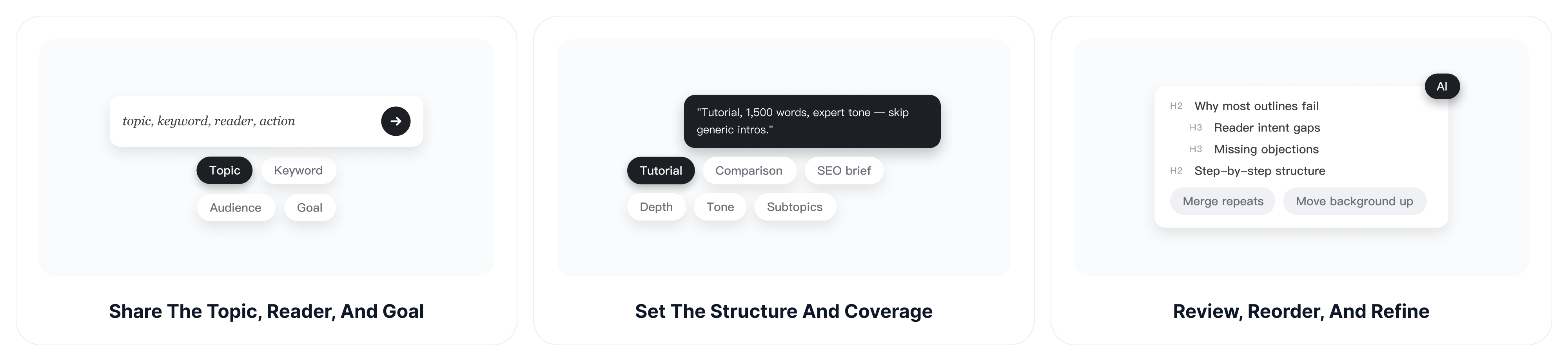
Give ChatGOAT AI enough context to organize the article around a real reader task. You can begin with only a topic, then add constraints as the direction becomes clearer.
Step 1: Share the Topic, Reader, and Goal
Enter the subject or working title, the primary keyword, the intended audience, and the action the reader should be able to take. If the article supports a product, campaign, or search query, explain that purpose too.
Step 2: Set the Structure and Required Coverage
Request the article type, desired depth, approximate length, tone, required subtopics, and anything to avoid. A free AI article outline generator is more useful when the prompt states whether you need a tutorial, list, comparison, thought-leadership article, or SEO brief instead of asking for a generic outline.
Step 3: Review, Reorder, and Refine
Check whether the headings follow the reader's journey, answer distinct questions, and give enough information for drafting. Ask ChatGOAT AI to merge repetitive sections, move background information earlier, add missing objections, or produce a second structure for comparison. If the topic contains many connected ideas, the AI mind map generator can help you see relationships before you finalize the linear outline.
Turn an AI Article Outline into a Writer-Ready Plan
The first generated structure is a starting point. Before drafting, convert it into a practical brief that explains what belongs in every section and what should stay out.
Match Each Section to One Reader Question
Write the main reader question beside every H2. If two sections answer the same question, combine them or define a sharper distinction. This test prevents the finished article from circling the same point with different headings.
Plan Evidence, Examples, and Internal Actions
Mark where the article needs a statistic, expert source, screenshot, calculation, comparison table, real example, or product demonstration. Add a section-level action such as choosing an option, completing a step, or checking a result. The outline then guides both research and writing instead of acting as a decorative table of contents.
Assign Depth before Word Count
Not every heading deserves the same length. Give more space to difficult decisions and high-intent questions, and keep definitions or transitions concise. If a 1,500-word guide has six major H2 sections, you might allocate 300 words to the key process, 250 to common mistakes, and much less to the introduction.
Use the Outline to Improve an Existing Article
You can also paste the title and current headings from an older post into ChatGOAT AI. Ask it to compare the existing structure with the reader's likely search intent, point out missing coverage, and suggest a better order. After revising the full draft, an AI essay grader can provide another perspective on organization, clarity, and support.
Why Choose ChatGOAT AI's Blog Outline Generator?
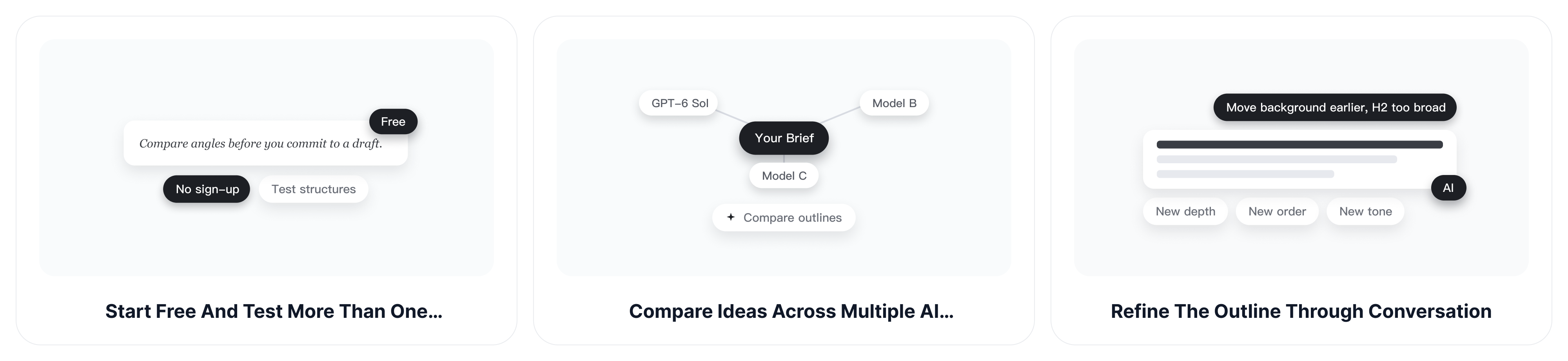
ChatGOAT AI combines the speed of an outline tool with the flexibility of a conversation. You can explore a structure, explain what does not fit, and keep refining the plan without rebuilding the brief from the beginning.
Start Free and Test More Than One Structure
Use ChatGOAT AI to explore alternative angles before committing to a draft. Compare a practical tutorial, a problem-solution structure, and a decision-focused version of the same topic, then keep the one that best matches the reader and business goal.
Compare Ideas across Multiple AI Models
Different models may prioritize different subtopics or organize the same brief in different ways. ChatGOAT AI brings multiple models into one platform, making it easier to compare approaches when the first outline feels predictable. GPT-6 Sol is one available option for working through detailed instructions and multi-step content planning.
Refine the Outline through Conversation
Tell ChatGOAT AI which heading is too broad, which idea belongs earlier, or which section repeats another. You can preserve the useful parts while changing the depth, tone, order, target audience, or required coverage instead of generating an unrelated outline from scratch.
Continue from Planning to Production in One Platform
An outline is only one part of the workflow. ChatGOAT AI also supports writing, analysis, study, translation, document work, and visual creation, so you can research questions, draft one section at a time, review the article, and prepare supporting assets in the same platform.
Blog Outline Generator FAQ
Use these answers to decide what information to provide, what to expect from the output, and how to review it before writing.
Can I Generate an Outline with Only a Topic?
Yes. A topic or working title is enough to begin. For a more relevant result, add the audience, search intent, article goal, preferred format, and one or two important subtopics.
Can I Add SEO Keywords to the Outline?
Yes. Provide the primary keyword and a small set of closely related terms, then ask ChatGOAT AI to place them only where they fit naturally. Keyword inclusion should support coverage and clarity rather than force every phrase into a heading.
What Should a Blog Post Outline Include?
A useful outline normally includes one H1, logically ordered H2 sections, selective H3 subsections, and notes about the points each section should cover. Depending on the article, it may also plan examples, evidence, visuals, FAQs, a conclusion, and a call to action.
Can I Change the Generated Headings?
Yes. Treat the output as an editable plan. Ask for shorter headings, a different tone, fewer sections, more depth, a new order, or alternatives for one heading without changing the rest of the outline.
Can I Use It for Different Blog Formats?
Yes. Specify whether you need a how-to guide, list post, comparison, case study, product-led article, opinion piece, or another format. The structure should reflect the job of the article rather than reuse the same template for every topic.
How Do I Know Whether the Outline Is Complete?
Check that it matches the reader's intent, moves in a logical order, gives each section a distinct purpose, and covers the decisions or questions needed to reach the promised outcome. Remove repetition, add missing objections or examples, and verify important claims during research before drafting.
Can I Use an Outline to Update an Existing Post?
Yes. Share the current title and heading structure, then ask ChatGOAT AI to identify gaps, outdated sections, weak ordering, and repeated coverage. This can help you plan a focused update without rewriting useful material unnecessarily.