Seedream 5.5, Seedream 5.0 Pro, and GPT Image 2.6 each have different strengths, so the best choice depends on your needs. This guide compares their image quality, editing performance, speed, and pricing, with examples to help you decide which model suits your workflow.
Seedream 5.5 vs 5.0 Pro vs GPT Image 2.6: Key Differences
| Category | Seedream 5.5 | Seedream 5.0 Pro | GPT Image 2.6 |
| Developer | ByteDance Seed Team | ByteDance | OpenAI |
| What it’s known for | Realism and consistent editing | Structured designs and infographics | Flexible image generation and editing |
| Editing | Up to 100 consecutive edits | Precise regional editing | Multi-turn editing |
| Text and layout | Low text-error rates in ByteDance tests | Information-dense layouts and multilingual text | Strong layout adherence |
| Transparent output | Native RGBA | Layer-separated PNG export | SVG export; native RGBA not confirmed |
| Resolution | 1K, 1.5K, 2K | 2K, upscaled to 4K | Up to 4K |
| Speed | No public benchmark listed | No public benchmark listed | 19–31 seconds for 2K High; faster lower-tier option reported |
| Pricing | From about $0.02 per image | Varies by platform | Varies by quality and usage |
| Availability | Jimeng, Doubao, and Volcano Ark | ByteDance platforms and supported services | OpenAI API and partner platforms |
Seedream 5.5 stands out for iterative editing and transparent output, Seedream 5.0 Pro offers more specialized controls for structured design work, and GPT Image 2.6 provides flexible generation with different speed and detail options.
What’s New in Seedream 5.5?
Improved Image Generation Quality
Seedream 5.5 aims to create more realistic images with clearer details and better-coordinated scenes. This is useful for product visuals, fashion imagery, and ads.
More Consistent Multi-Turn Image Editing
Make several changes - such as adjusting a background or product color - while keeping other parts of the image more stable.
Better Text Rendering and Multilingual Support
Improved text rendering makes Seedream 5.5 a stronger option for posters, packaging, and marketing graphics with text.
Expanded Creative Tools and Editing Capabilities
Seedream 5.5 supports workflows that involve both creating images and refining them through multiple edits.
Feature Comparison: Seedream 5.5 vs 5.0 Pro vs GPT Image 2.6
Here’s a simplified comparison:
| Feature | Seedream 5.5 | Seedream 5.0 Pro | GPT Image 2.6 |
| Text-to-image | Yes | Yes | Yes |
| Image editing | Yes | Yes | Yes |
| Reference images | Up to 10 | Up to 10 | Up to 16 |
| Multi-turn editing | Yes; ByteDance demonstrates up to 100 rounds with pixel-level preservation in unedited areas | Yes | Yes |
| Aspect ratios | 1:16–16:1 | 1:16–16:1 | 1:3–3:1 |
| Native GIF generation | No | No | Yes |
| SVG output | No | No | Yes |
| Targeted markup editing | Text and visual marks | Marks and selection tools | Circles and arrows |
| Complexity control | No native equivalent | No native equivalent | Includes a Planning control |
| Main strength | Consistent, precise local edits | Structured designs and regional editing | Flexible creative controls and multiple output formats |
Real-World Tests: Which Model Performs Best?
To compare the models, use the same prompts and reference images for each test. These four tasks assess text-to-image generation, image editing, complex text rendering, and multi-image composition.
Text-to-Image Generation and Character Consistency
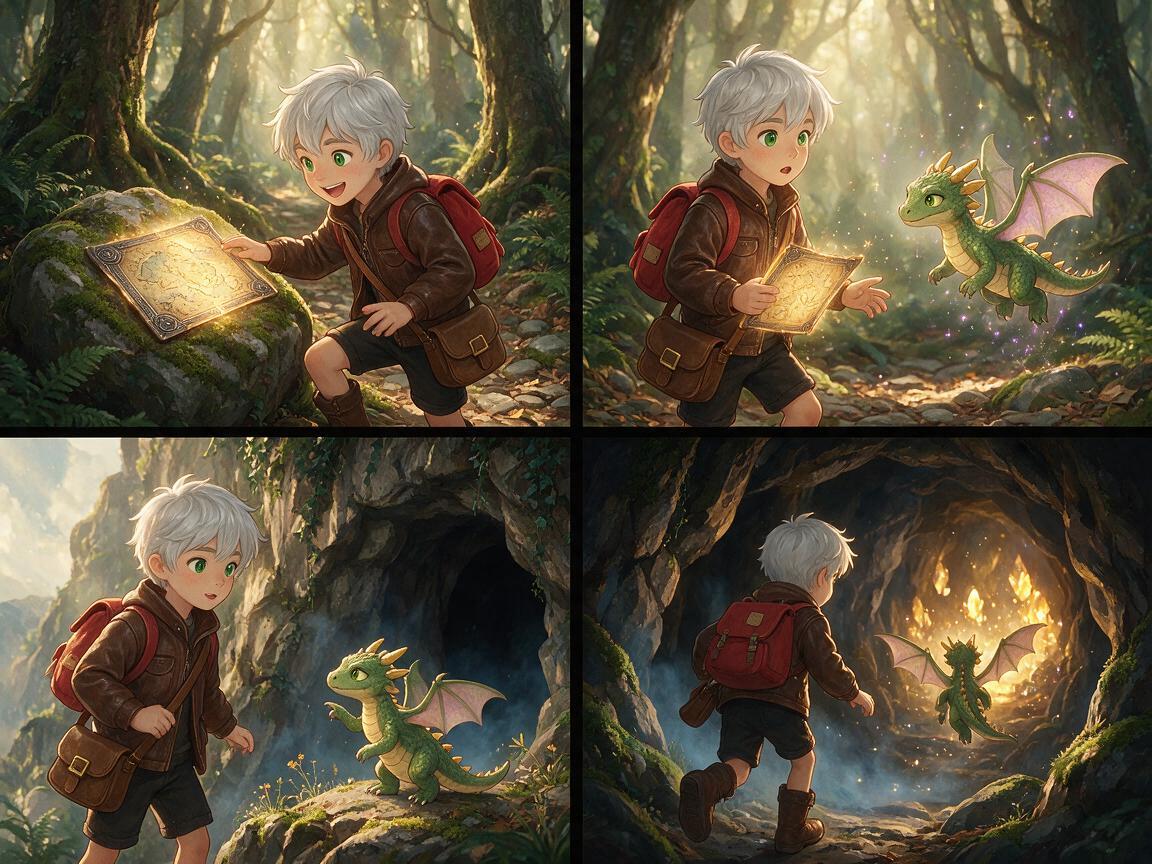
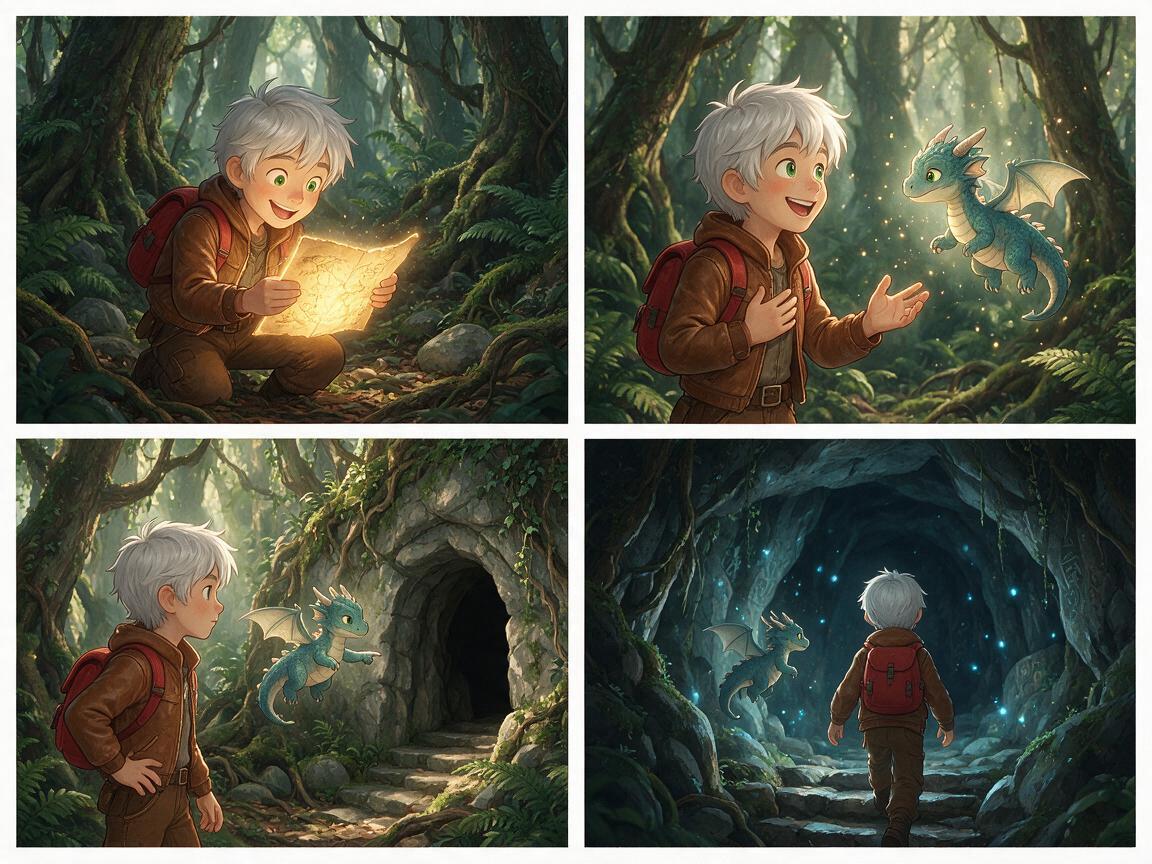
Creating a multi-panel comic tests whether a model can follow a detailed brief while keeping the same character recognizable across different scenes and poses.
Test Prompt: “Create a four-panel comic about a young fantasy explorer with short silver hair, green eyes, a brown leather jacket, and a small red backpack. In panel one, the explorer finds a glowing map in an old forest. In panel two, a tiny dragon appears. In panel three, the dragon points toward a hidden cave. In panel four, they enter the cave together. Keep the explorer’s face, hairstyle, clothing, and proportions consistent in every panel. Use a clear comic-book layout, expressive poses, and no dialogue or captions.”
Check whether all four panels tell the requested story and whether the explorer’s appearance stays consistent throughout.
Seedream 5.5
Seedream 5.0 Pro
GPT Image 2.6
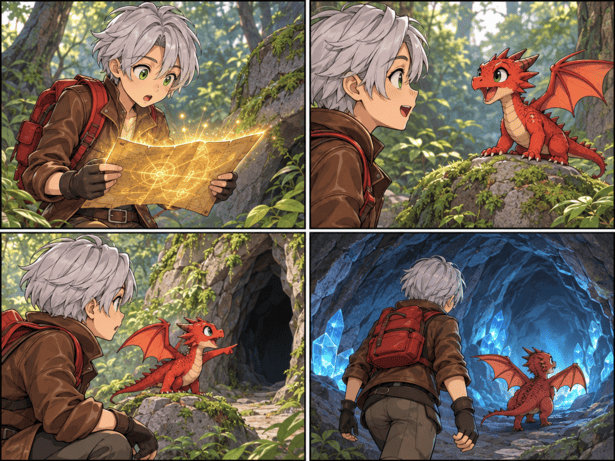
Image Editing and Detail Preservation
Image editing tests whether a model can make a specific change while preserving the rest of the original image.
Test Prompt: “Edit the uploaded portrait by changing the background to a softly lit garden at golden hour. Keep the person’s face, expression, hairstyle, clothing, pose, and position unchanged. Match the new background’s lighting to the subject and preserve a natural, realistic appearance.”
Compare how accurately each model makes the requested edit without changing unrelated details.
Seedream 5.5

Seedream 5.0 Pro

GPT Image 2.6

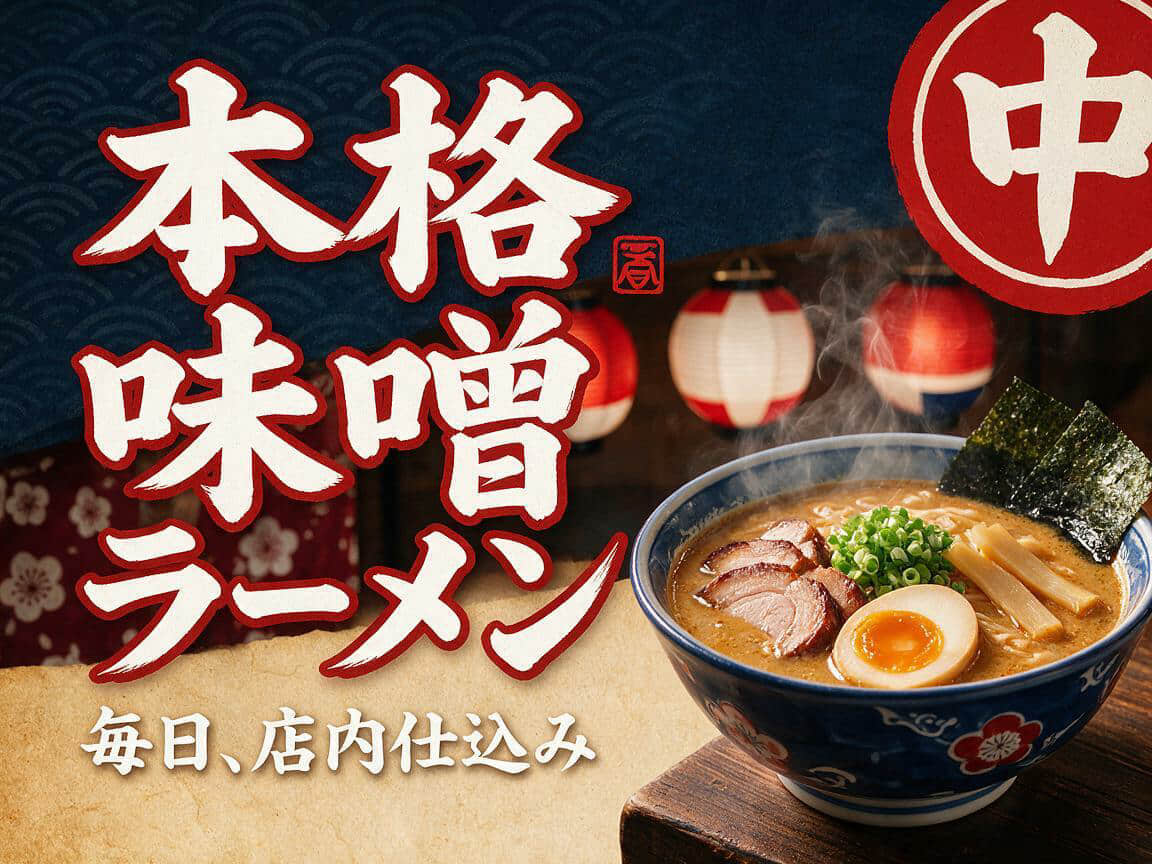
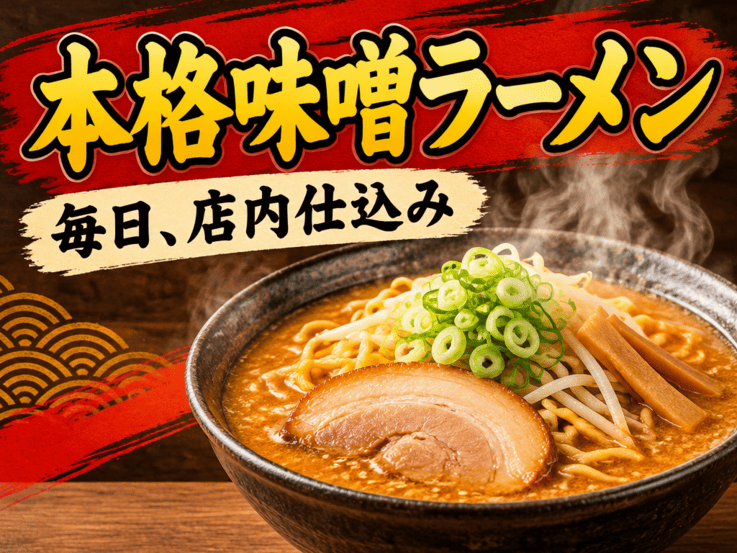
Complex Multilingual Text Rendering
This test checks how well each model renders exact text in another language, including detailed characters and a clear layout.
Test Prompt: “Create a Japanese ramen shop poster with the exact headline ‘本格味噌ラーメン’. Add the smaller text ‘毎日、店内仕込み’ beneath it. Preserve every Japanese character exactly as written. Use bold, readable lettering and arrange the text clearly beside a steaming bowl of ramen. Do not add any other words or characters.”
Check the spelling, character accuracy, legibility, and placement of the text.
Seedream 5.5

Seedream 5.0 Pro
GPT Image 2.6
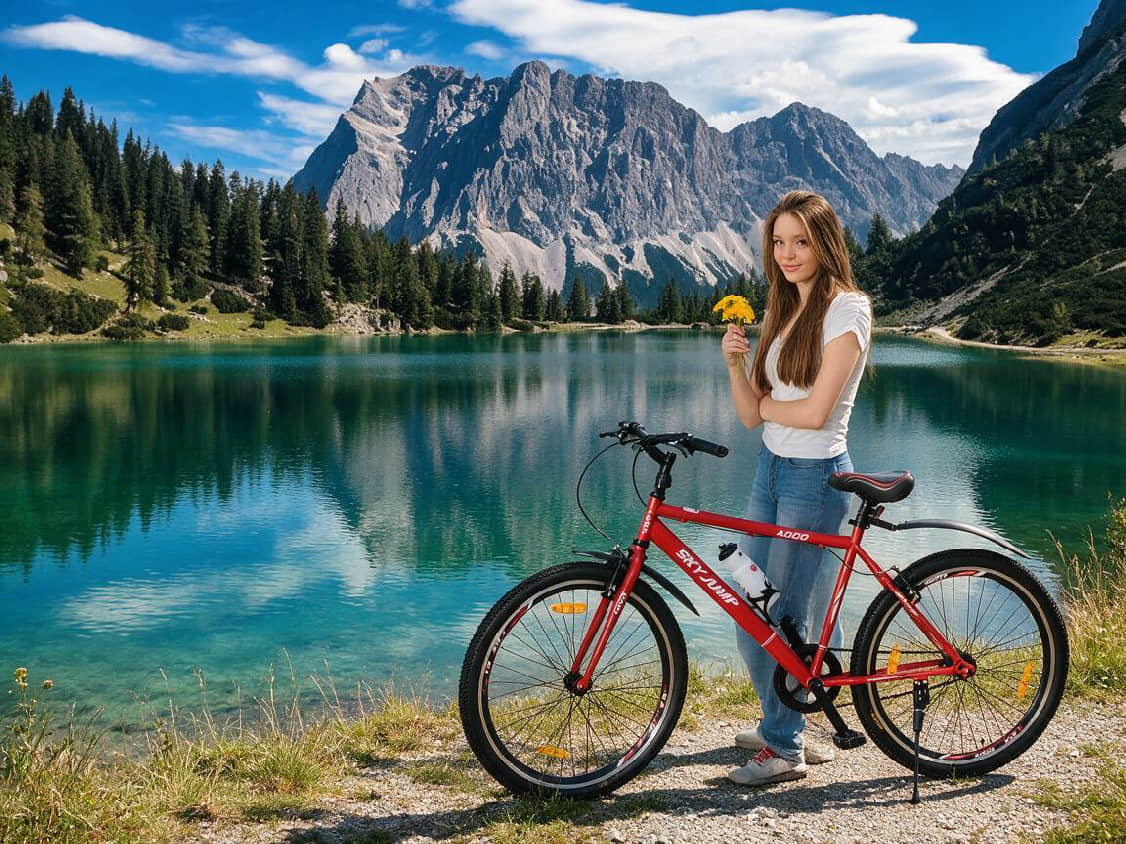
Combining Multiple Reference Images into One Scene
Combining several reference images into one scene tests whether a model can use multiple visual inputs while maintaining the important details of each.
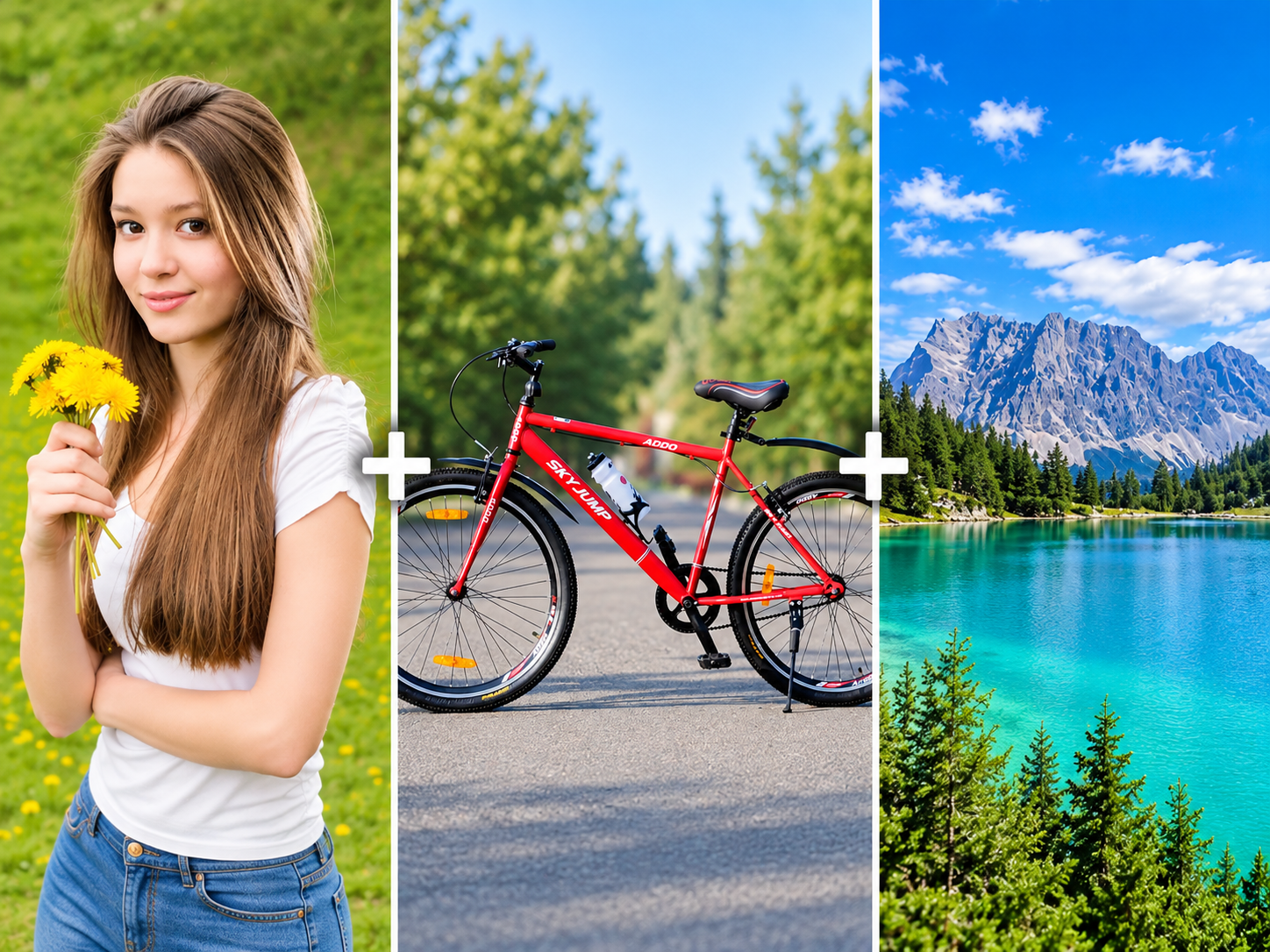
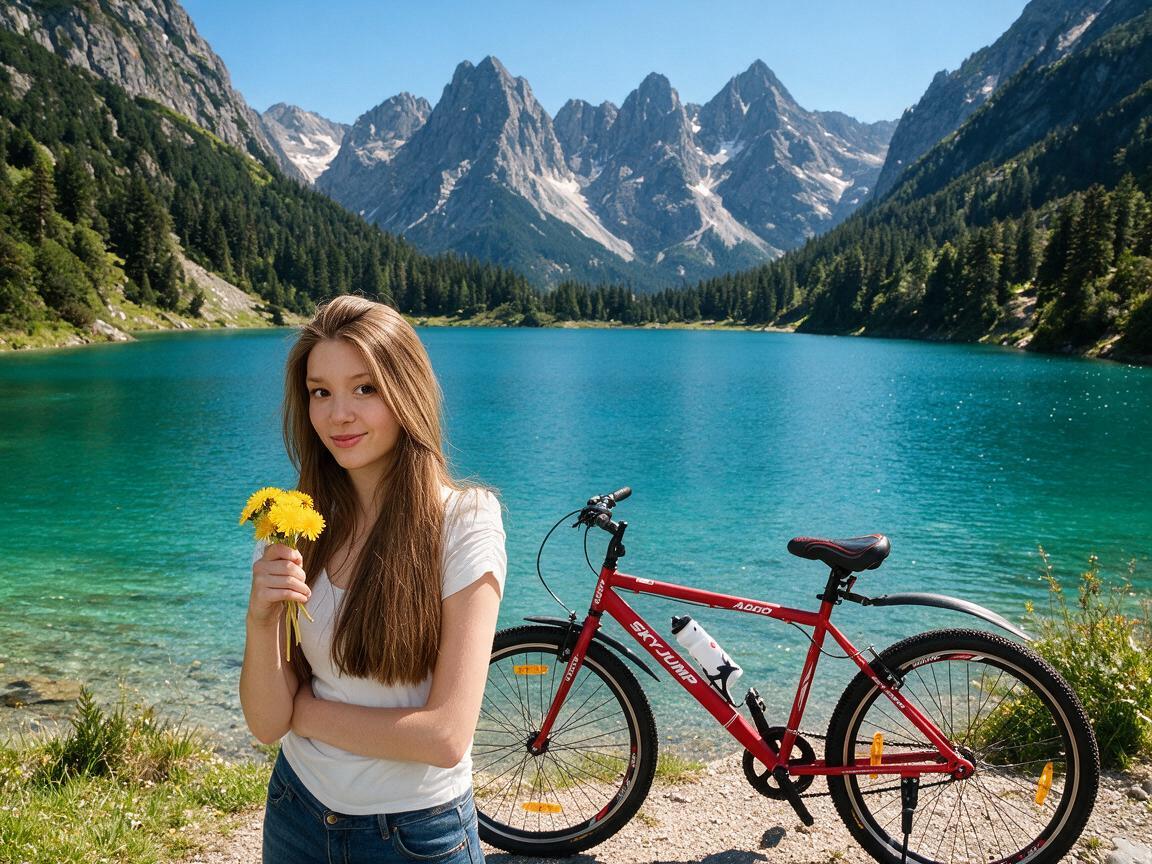
Test Prompt: “Combine the uploaded images into one polished travel advertisement. Use the person from the first image, the red bicycle from the second, and the mountain lake from the third. Show the person standing beside the bicycle near the lake. Preserve the person’s appearance, the bicycle’s design and color, and the key features of the landscape. Match the lighting, perspective, scale, and shadows so the elements look naturally photographed together. Do not add text.”
Compare how well each model preserves the reference details and blends the images into a cohesive scene.
Seedream 5.5
Seedream 5.0 Pro
GPT Image 2.6
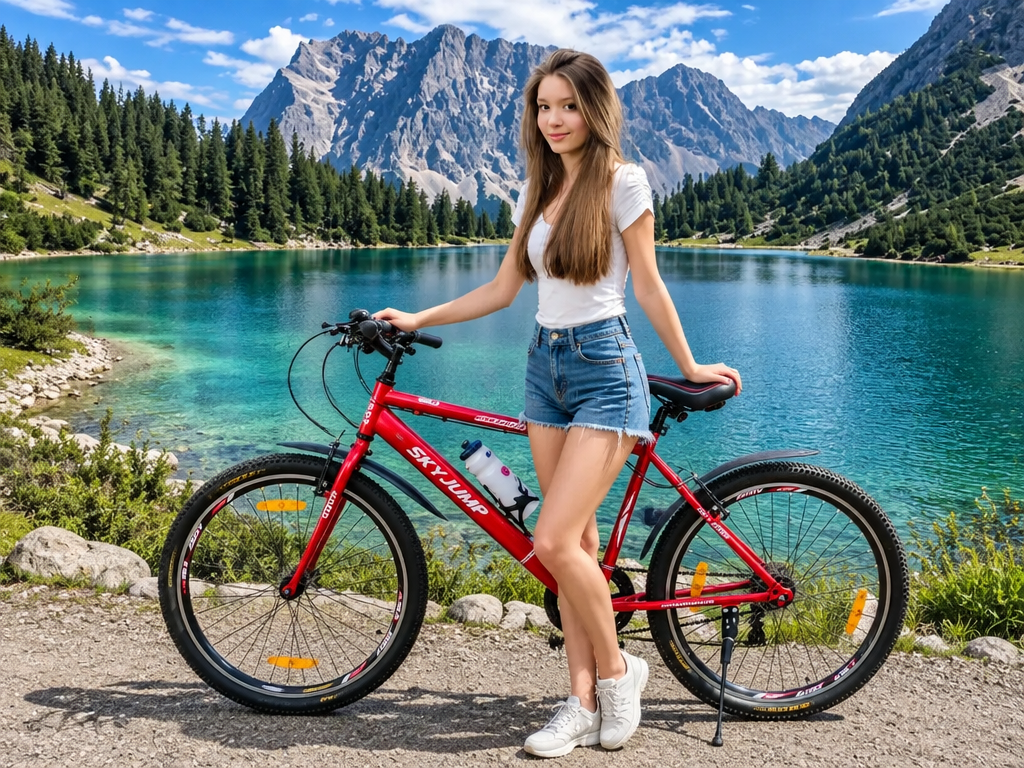
Image Generation Speed: Which Model Is Fastest?
Generation times vary by platform, image settings, and server load, so the figures below are best treated as a general guide rather than a direct benchmark.
- GPT Image 2.6 (Flare): Reported to generate 2K high-quality images in around 19–31 seconds, with vendor claims of about 6 seconds at lower quality settings. It’s designed for quick drafts and rapid iteration.
- Seedream 5.5: No official speed benchmark is available. Third-party tests report around one to two minutes for 2K images, depending on queue times. Its slower generation is balanced by features such as multi-turn editing and native RGBA output.
- Seedream 5.0 Pro: Reported to take just over a minute for 2K images in standard comparisons. It focuses more on structured layouts and regional editing than fast generation.
Seedream 5.5 vs 5.0 Pro vs GPT Image 2.6 Pricing
Pricing depends on the model’s billing method, so the per-image rates aren’t directly comparable.
| Model | Pricing | Billing method |
| Seedream 5.5 | From $0.02 per image | Monthly subscription |
| Seedream 5.0 Pro | 0.045perimageat1.5Korlower; 0.045perimageat 1.5Korlower;0.09 above 1.5K | Pay-as-you-go API |
| GPT Image 2.6 | $30 per 1 million output image tokens | Token-based API |
Which Model Offers Better Value?
Seedream 5.5 may suit users who prefer a subscription and need frequent image generation. Seedream 5.0 Pro charges per image, with the price increasing for outputs above 1.5K. GPT Image 2.6 uses token-based billing, so the final cost depends on usage. Compare the total cost for your typical image size and workload before choosing.
Which AI Image Model Should You Choose?
Choose Seedream 5.5 for Advanced Image Generation and Editing
Seedream 5.5 is a good fit if you regularly refine images or need details to stay consistent across several edits. Consider it for:
- Realistic product, fashion, or advertising images
- Visuals that include short text
- Editing workflows where the subject and untouched areas should remain stable
Choose Seedream 5.0 Pro for Structured Visual Design
Seedream 5.0 Pro may suit teams whose work depends on clear layouts and targeted adjustments. It’s worth considering for:
- Posters, infographics, and text-heavy designs
- Editing specific regions with marks or selection tools
- Existing workflows that already use the model effectively
Choose GPT Image 2.6 for Flexible Image Generation and Editing
GPT Image 2.6 is a versatile option for creators who work across different types of image tasks. Choose it if you want:
- A general-purpose model for generating and editing images
- Faster drafts and creative iteration with Flare
- Additional output options, including GIF and SVG through the API
How to Try Seedream 5.5, Seedream 5.0 Pro, and GPT Image 2.6 on ChatGOAT AI
You can try Seedream 5.5, Seedream 5.0 Pro, and GPT Image 2.6 for free on ChatGOAT AI. Run the same prompt or edit the same image with each model to compare their results and see which one best suits your workflow.
ChatGOAT AI also brings together a range of other useful tools, including AI video, text to video, product name generator, and AI documents. You can explore additional image models, too, such as nano banana and Seedream 5.0 Flash, all in one place.
Step 1. Open ChatGOAT AI and go to the image generation tool.
Step 2. Select Seedream 5.5, Seedream 5.0 Pro, or GPT Image 2.6.
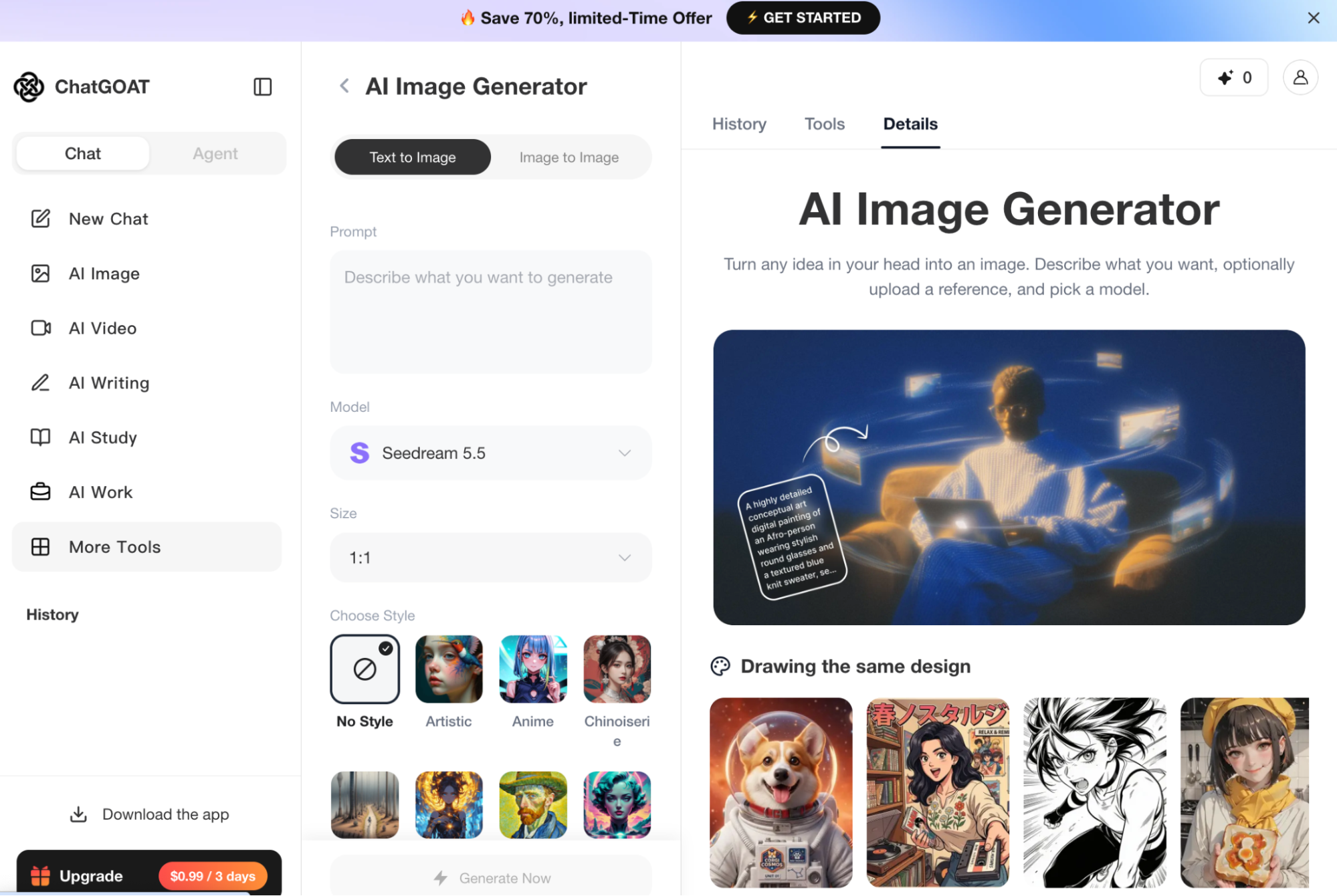
Step 3. Enter the same prompt or upload the same source image for each model.
Step 4. Generate the images and compare the results.
Final Verdict
There’s no single best model for every task. Seedream 5.5 is a strong choice for realistic images and repeated edits, while Seedream 5.0 Pro remains useful for structured designs and workflows that already rely on it. GPT Image 2.6 is a good fit for creators who want a flexible model for different image tasks, with fast iteration through Flare.
Choose based on the work you do most: Seedream 5.5 for consistent editing, GPT Image 2.6 for versatility, or Seedream 5.0 Pro if it already fits your design process.
Frequently Asked Questions
What is the difference between Seedream 5.5 and Seedream 5.0 Pro?
Seedream 5.5 focuses on realistic images and consistent multi-turn editing. Seedream 5.0 Pro is geared toward structured designs and precise regional edits.
Is Seedream 5.5 better than GPT Image 2.6?
For repeated edits and image consistency, Seedream 5.5 may be a better fit. GPT Image 2.6 offers more flexibility and faster iteration with Flare.
Which is better, Seedream 5.0 Pro or GPT Image 2.6?
Seedream 5.0 Pro offers tools for targeted regional edits. GPT Image 2.6 is more versatile and supports formats such as GIF and SVG through its API.
Which model is best for AI image editing?
Seedream 5.5 is worth trying for multi-turn edits where preserving unchanged details matters. The best choice depends on your image and editing workflow.
Which model is more affordable?
The total cost depends on your image settings and how many revisions your workflow requires. You can try Seedream 5.5, Seedream 5.0 Pro, and GPT Image 2.6 for free on ChatGOAT AI and compare their results before choosing.

