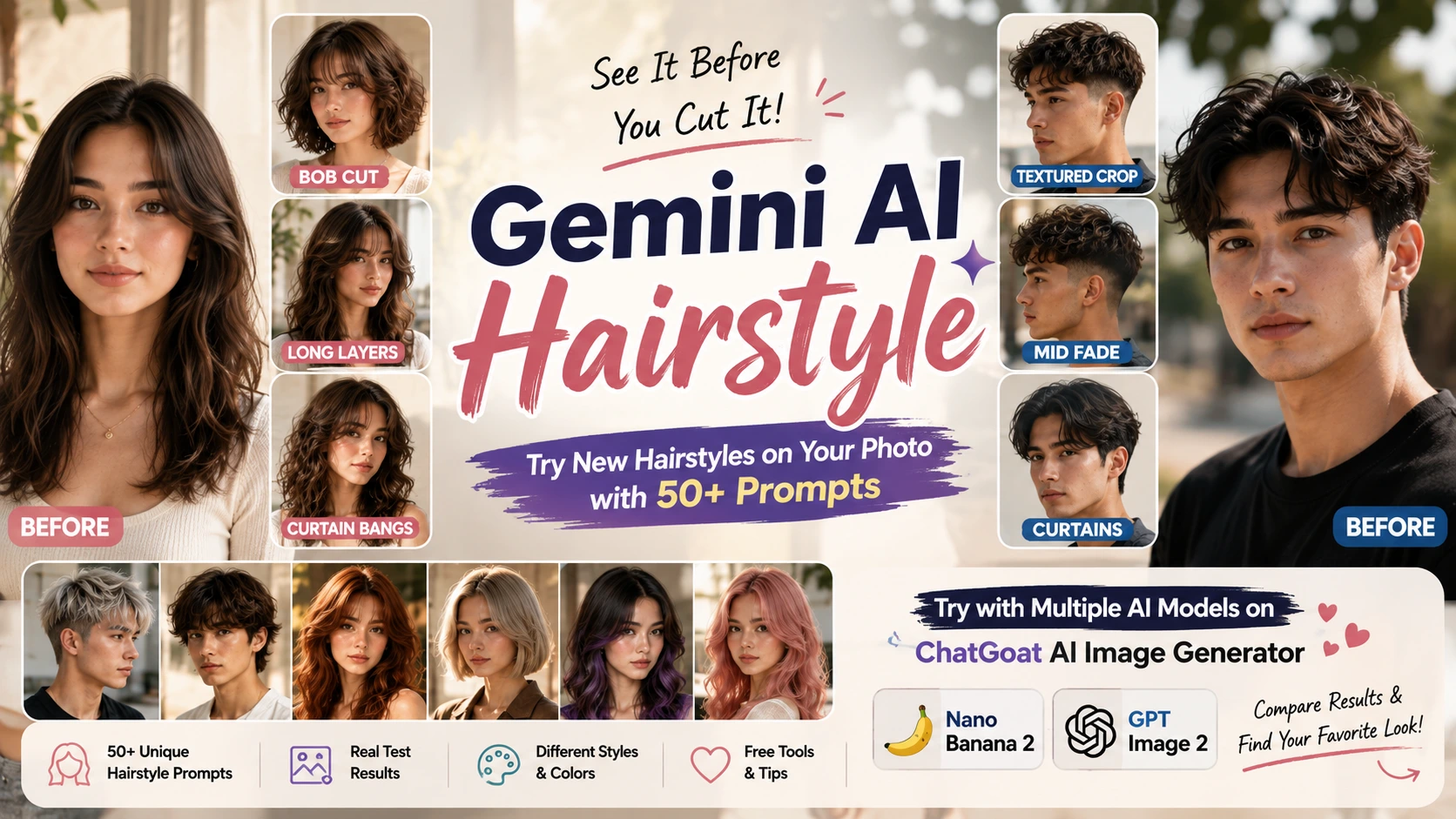
Maybe you have been staring at a photo of a bob for three weeks, wondering if it would actually suit you. Maybe you want bangs but you are terrified of regretting them the moment the scissors touch your hair. Or maybe you already have a fade booked with your barber and you just want to see roughly what a lower guard number would look like before you commit.
This is exactly the situation where a gemini ai hairstyle test becomes useful. Instead of guessing, you can upload a photo of yourself and ask Gemini to edit it, showing a new haircut, a new length, a new texture, or a new color on your actual face.
It is worth being upfront about something though. An AI generated hairstyle image is a visual reference, not a guarantee of how a real haircut will turn out. Your natural hair density, texture, hairline shape, face proportions, and how you actually style your hair day to day will all affect the real result. Think of it as a sketch you can bring into a conversation with your stylist, not a contract.
I spent time testing Gemini on the same reference photo across several very different hairstyle requests, from a clean bob to a dramatic color change, and this article walks through what actually happened, what prompts worked best, and how to fix the most common problems people run into.
Key Takeaways
- A gemini ai hairstyle prompt works best when it describes the cut, length, texture, and volume separately instead of using one vague sentence like "give me a new hairstyle."
- Simple, well defined shapes such as a bob or a taper tend to hold up better than dramatic changes like a full color and cut combo in a single request.
- Identity drift (the face subtly changing) is the most common issue, and it is usually reduced by explicitly asking the model to keep facial features, skin tone, and expression unchanged.
- Free access to Gemini's image editing features can vary depending on your account, region, and current usage limits, so it is worth checking your own account rather than assuming unlimited free use.
- Testing the same prompt across more than one image model, such as through ChatGoat AI Image Generator, can reveal differences in hair texture, realism, and how closely each model follows your instructions.
What Is Gemini AI Hairstyle?
Gemini ai hairstyle refers to using Google's Gemini image tools to edit a photo of yourself so it shows a different haircut, hairstyle, hair texture, length, or color, based on a written prompt.
Instead of generating a completely new face from scratch, the idea is to keep your actual photo as the starting point and change only the hair. Google's Nano Banana 2 model, available through Gemini, supports uploading an image and requesting local edits, meaning it can target a specific part of a photo, such as the hair, while trying to leave the rest of the image alone.
This is genuinely useful before a real haircut because it gives you something concrete to look at and discuss, rather than trying to describe a vague idea to your stylist with your hands. That said, feature availability, generation limits, and exactly which models you can access will depend on your Google account, your region, and whatever Google currently offers, so it is worth checking your own Gemini app or website before assuming a specific feature is available to you.
How to Use Gemini AI to Change Your Hairstyle
Step 1: Start With a Good Photo
The photo you upload matters more than most people expect. A few things make a real difference:
- A clear, front facing or slightly angled view of your face
- Even lighting, ideally natural light rather than harsh overhead lighting or heavy shadows
- Your current hair visible and not tucked under a hood, hat, or scarf
- A natural expression rather than an extreme angle or exaggerated pose
- Minimal obstruction from glasses, hands, or hair covering your face
A blurry selfie taken in a dim room will almost always produce a messier result than a clear, well lit photo, no matter how good your prompt is.
Step 2: Upload Your Photo
Once you have a usable photo, upload it into Gemini and describe the change you want. You are essentially asking the model to edit the existing image rather than create something new from nothing, which is why the quality of the source photo carries so much weight.
Step 3: Describe the Hairstyle Clearly
"Give me a nice haircut" is not a prompt, it is a wish. The model has no idea what "nice" means to you, so it will make its own assumptions, and those assumptions are often generic.
Instead, describe:
- The specific cut (bob, pixie, wolf cut, taper, and so on)
- Length (chin length, shoulder length, above the ears)
- Texture (straight, wavy, loose curls, tight coils)
- Volume (flat and sleek, or full and voluminous)
- Fringe or bangs, if any
- Color, if you want one
The more specific you are, the less room there is for the model to guess wrong.
Step 4: Refine the Result
You almost never get the perfect result on the first try, and that is normal. Treat it like a conversation rather than a single request. A realistic workflow looks something like this:
- First request: change the overall haircut shape.
- Second request: adjust the length once you see the initial result.
- Third request: change the color if you want to test that separately.
- Fourth request: fix a specific detail, such as too much volume or an odd fringe shape.
Breaking the process into smaller steps almost always produces a cleaner result than trying to describe everything at once.
How to Write a Better Gemini AI Hairstyle Prompt
A strong gemini ai hairstyle prompt usually includes several distinct pieces of information rather than one generic sentence. Here is what each part does and why it matters.
The requested haircut. Name the actual style you want, not just a vague mood. "Wolf cut" gives the model something concrete to work with. "Cool haircut" does not.
Hair length. Length changes the entire silhouette of a hairstyle. A bob at chin length reads completely differently from a bob at collarbone length, even though both are technically "a bob."
Hair texture. Straight, wavy, curly, and coily hair all catch light and fall differently. If your natural texture is curly and you want to preview a straight style, say so directly.
Hair volume. Some cuts are meant to look sleek and flat, others are meant to look full and lifted at the root. Leaving this out lets the model default to whatever it thinks looks good, which may not match your actual hair.
Fringe or bangs. Specify the type (curtain, blunt, wispy, side swept) since "bangs" alone covers a huge range of looks.
Hair color. Be specific about warmth and depth. "Brown" could mean almost anything, while "warm chestnut brown" narrows it down.
Face preservation instructions. Ask the model to keep your facial features, skin tone, and expression the same. This single instruction meaningfully reduces the chance of the model quietly altering your face while it changes your hair.
Lighting preservation. Mentioning that the original lighting should stay the same helps the result blend more naturally with the rest of the photo.
Background preservation. Without this, some results shift the background, the clothing, or even small details like jewelry.
Realistic hair details. Asking for natural strand variation, subtle flyaways, and believable density helps avoid the flat, plasticky look that AI generated hair sometimes has.
The Best Gemini AI Hairstyle Prompt Formula
Here is a simple structure you can adapt for almost any hairstyle idea:
Change the hairstyle, then specify the cut, then specify the length, then specify the texture, then add identity preservation, then preserve the original photo conditions, then add realistic hair detail.
A few original examples using this structure:
"Edit this photo so the hair becomes a soft, chin length French bob with slightly rounded ends and gentle inward curl at the tips. Keep my face, skin tone, and expression exactly as they are in the original photo. Keep the lighting and background unchanged. Add natural strand texture rather than a smooth, uniform block."
"Change the hairstyle to a modern wolf cut with heavily layered top sections, choppy face framing pieces, and a slightly tousled finish, while leaving the length in the back around shoulder length. Preserve my facial features and expression exactly. Keep the background and clothing the same. Include a few natural flyaways so the hair does not look overly smoothed out."
"Edit only the hair to show a warm honey blonde color with subtle darker roots for a natural grown out look. Do not change the haircut, the face, the skin tone, or the background. Keep the hair's natural shine and slight texture rather than making it appear flat."
50+ Gemini AI Hairstyle Prompts to Try
Use these as starting points and adjust the wording to match your own hair and face.
Short Hairstyle Prompts
- Edit the hair into a French bob that hits just below the jaw, with a slight outward flick at the ends and soft face framing pieces near the cheeks. Keep the face and background unchanged.
- Show a textured bob with choppy, uneven layers throughout and a slightly undone, piece y finish rather than a smooth blunt cut.
- Change the hairstyle to a soft pixie with longer pieces on top that sweep gently to one side, and shorter, closely cropped sides.
- Edit the hair into a bixie, combining a pixie length at the back and sides with slightly longer, wispy pieces around the face.
- Show a layered short cut with movement through the crown and softer, feathered ends rather than one solid blunt line.
- Change the hairstyle to a modern crop with textured, slightly spiked pieces on top and a clean, short perimeter.
- Edit the hair into a chin length bob with a subtle inward curl and a slightly rounded, soft silhouette.
- Show a rounded bob that curves gently under at the ends, keeping the same natural hair color and thickness as the original photo.
Long Hairstyle Prompts
- Edit the hair to show long layers starting around the collarbone, with soft movement through the ends rather than one flat length.
- Change the hairstyle to butterfly inspired layers, with shorter framing pieces near the face and longer layers cascading toward the back.
- Show soft, loose waves throughout hair that reaches mid back length, with natural volume at the crown.
- Edit the hair into a straight, sleek style reaching past the shoulders, with a subtle center part and glossy finish.
- Change the hairstyle to include face framing layers that curve gently toward the chin, while keeping the rest of the length long and mostly straight.
- Show a long curtain fringe that parts naturally in the middle and blends into layers around the face.
- Edit the hair into voluminous layers with noticeable lift at the roots and soft, bouncy movement toward the ends.
- Change the hairstyle to natural, loose curls extending past the shoulders, with visible curl pattern rather than a tight, uniform spiral.
Trendy Hairstyle Prompts
- Edit the hair into a wolf cut with heavy layering on top, a slightly shaggy silhouette, and choppy ends throughout.
- Show a shag haircut with feathered layers, a soft fringe blending into the sides, and a slightly undone texture.
- Change the hairstyle to a Hime inspired cut, with sharply cut side pieces framing the face and a straight, blunt fringe.
- Edit the hair into a modern mullet, shorter through the crown and sides with noticeably longer, textured pieces at the back.
- Show Korean inspired layers with a soft, rounded fringe and gentle inward curl at the ends for a youthful shape.
- Change the hairstyle to include a textured, slightly wispy fringe that sits just above the eyebrows, paired with loose layers.
Men's Gemini AI Hairstyle Prompts
- Edit the hair into a low taper with short, clean sides gradually blending into slightly longer length on top.
- Change the hairstyle to a mid fade with a sharper contrast between the sides and the longer top section, styled with light texture.
- Show a textured crop with choppy, piece y strands on top and a soft, natural finish rather than a heavily gelled look.
- Edit the hair into a French crop with a short, textured fringe and closely cropped sides.
- Change the hairstyle to a two block style, with noticeably longer hair on top left loose or slightly styled, and much shorter sides underneath.
- Show a messy fringe falling naturally across the forehead, paired with medium length hair on top.
- Edit the hair into a slicked back style with visible comb lines and a glossy finish, while keeping the sides shorter and neat.
- Change the hairstyle to a medium length layered cut with natural movement, slightly longer on top than at the sides.
- Show a clean buzz cut with even, short length throughout and natural texture visible close to the scalp.
- Edit the hair into a curly taper, keeping natural curl definition on top while fading shorter toward the sides.
Bangs and Fringe Prompts
- Change the hairstyle to include curtain bangs that part naturally in the middle and frame both sides of the face.
- Edit the hair to add a wispy fringe with soft, uneven pieces rather than one solid blunt line.
- Show a blunt fringe cut straight across just above the eyebrows, paired with the rest of the hair left unchanged.
- Change the hairstyle to a side swept fringe that angles across the forehead toward one side.
- Edit the hair to include a soft, Korean inspired fringe with rounded edges and gentle layering underneath.
- Show a micro fringe cut short above the eyebrows, keeping the rest of the hairstyle the same length as the original photo.
- Change the hairstyle to a long, face framing fringe that blends into layers rather than sitting as a separate block.
Curly and Wavy Hairstyle Prompts
- Edit the hair to show tight, defined coils throughout, with visible individual curl clumps rather than one solid curly mass.
- Change the hairstyle to loose, beachy waves with natural texture and slight frizz at the ends for a lived in look.
- Show a curly bob with springy, well defined curls that shrink up toward chin length.
- Edit the hair into voluminous curls with noticeable lift at the crown and a rounded overall shape.
- Change the hairstyle to soft, S shaped waves that fall naturally without looking overly uniform.
Hair Color Prompts
- Change only the hair color to a deep chocolate brown, keeping the exact same haircut, face, and background.
- Edit the hair color to a cool ash brown with subtle lighter pieces framing the face.
- Show the hair recolored to a warm copper tone, keeping the natural shine and texture visible.
- Change the hair color to a soft, warm honey shade with slightly darker roots for a natural grown out effect.
- Edit the hair color to a deep burgundy, keeping the original haircut and hairstyle exactly the same.
- Show the hair recolored to a blue black shade with visible shine under the original lighting.
- Change the hair color to a cool platinum blonde, keeping the same face, skin tone, and background as the original photo.
- Edit the hair color to a soft rose brown with subtle warmth, blended naturally rather than looking flat.
- Show a balayage effect with gradually lightened ends fading up into a darker natural root color.
Best Gemini AI Hairstyles for Different Face Shapes
There is no single hairstyle that is objectively correct for every face shape, but certain shapes and proportions often work well together as a general starting point.
| Face Shape | Hairstyles That Often Work Well |
|---|---|
| Oval | Most lengths and cuts, including blunt bobs, long layers, and fringe |
| Round | Layers with height at the crown, side swept fringe, angled bobs |
| Square | Soft waves, rounded layers, side parted styles that soften the jaw |
| Heart | Chin length bobs, curtain bangs, styles with volume near the jaw |
| Long | Layered cuts with width, wavy textures, fringe to shorten face length |
| Diamond | Styles with volume at the temples and chin, soft side swept fringe |
A useful gemini ai hairstyle prompt for this purpose:
"Based on the visible face shape and proportions in this photo, suggest and show three different hairstyle options that could create a balanced look. Keep the person's facial features, skin tone, and expression exactly the same in each version."
Best Gemini AI Hairstyles for Different Hair Types
The same haircut can look dramatically different depending on your natural texture and density, which is worth remembering when comparing your result to a photo of someone with different hair.
| Hair Type | What to Keep in Mind |
|---|---|
| Straight | Blunt lines and sleek shapes tend to hold their intended silhouette |
| Wavy | Layers can enhance natural movement without adding too much bulk |
| Curly | Curl shrinkage means length previews may look shorter once dry |
| Coily | Volume and shape can differ significantly from straightened previews |
| Fine | Blunt cuts and shorter lengths often create the appearance of more density |
| Thick | Layers can help remove bulk and prevent a heavy, triangular shape |
A practical prompt example: "Edit the hair into a layered bob, keeping the natural wavy texture and volume consistent with the original photo rather than smoothing it into a straight style."
Real Test: Gemini AI Hairstyle Results on the Same Photo
I used one reference portrait and tested several different hairstyle changes on it to see how consistent and realistic the results were.
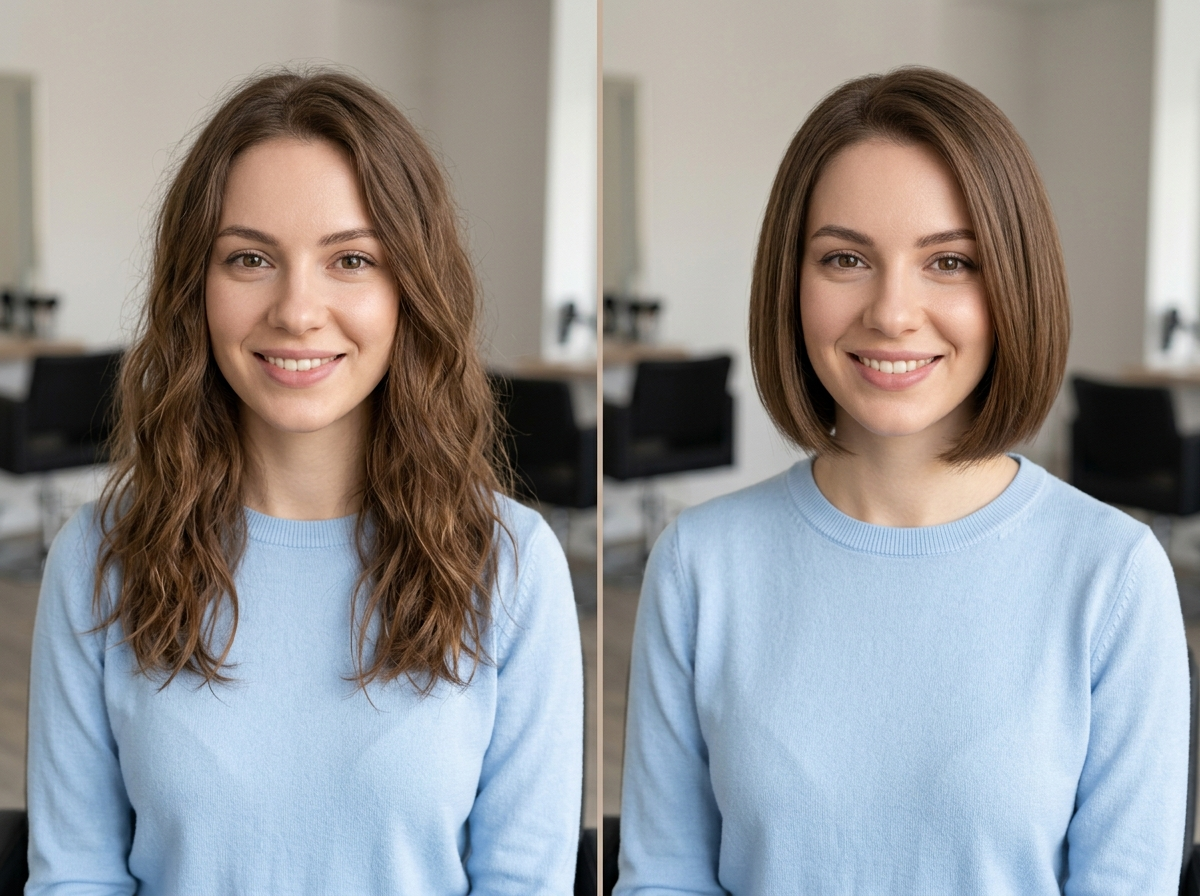
Bob. This was one of the cleaner transformations, likely because a bob is a simple, well defined shape with a clear length and silhouette. The face stayed close to the original, and the hairline looked believable.
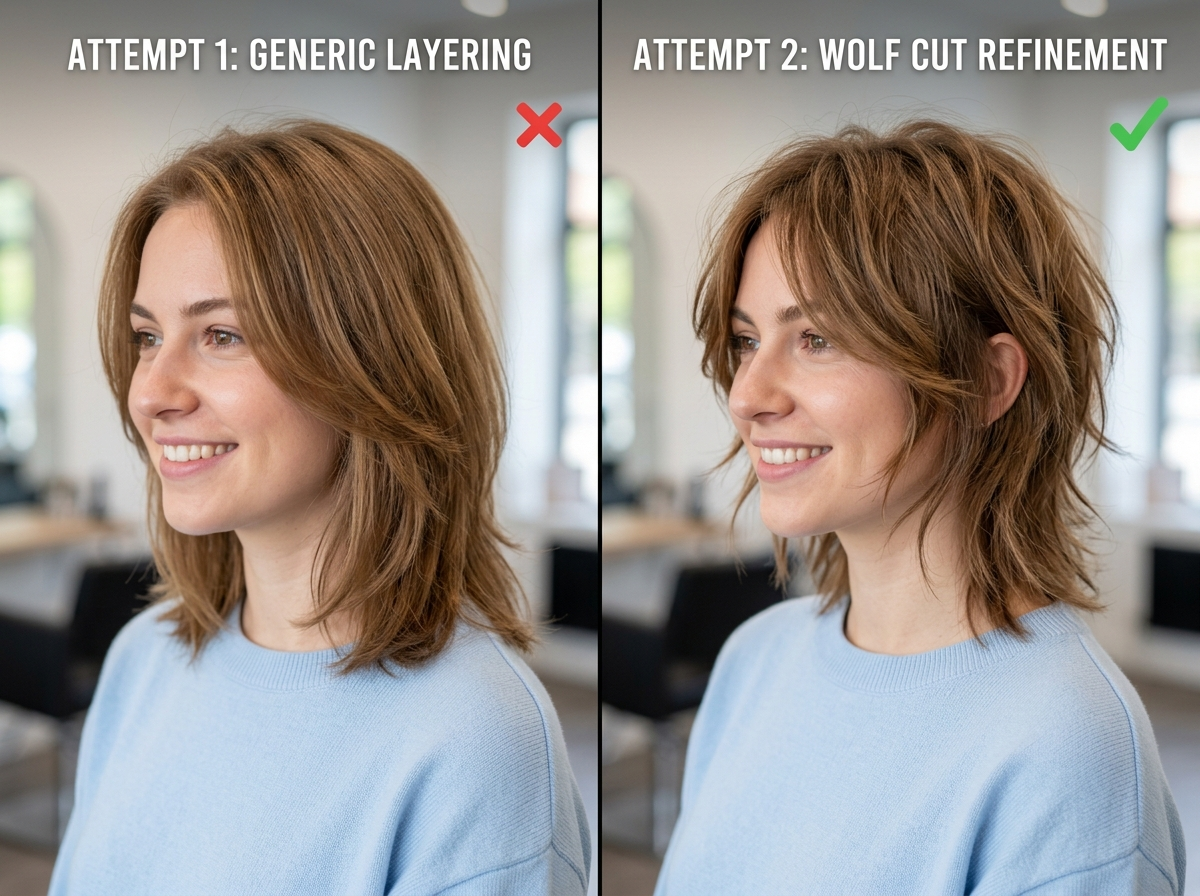
Wolf cut. The first attempt looked a bit generic, with the layering not quite matching a true wolf cut shape. A second refinement focused specifically on the face framing layers produced a noticeably more convincing result.
Long layered hair. This transformation blended well with the original photo, though the very ends of the hair looked slightly too uniform compared to how real hair usually falls.
Curtain bangs. The fringe shape itself looked accurate, but the first version pushed the hairline slightly too far forward. Asking specifically for a natural hairline transition fixed this in the next attempt.
Pixie cut. This was a more dramatic change from the original length, and it took two attempts to get proportions that matched the face rather than looking slightly too boxy at first.
Men's textured crop. This translated cleanly, likely because short, structured cuts have less room for ambiguity than longer, flowing styles.
Hair color transformation. The color change was easier for the model than a dramatic haircut, since the original hair shape could remain mostly unchanged while only the tone shifted.
These are editorial observations based on my own testing on one photo, not a controlled scientific benchmark, and results will vary depending on your source photo and prompt wording.
| Hairstyle Tested | Face Consistency | Hairline Realism | Notes |
|---|---|---|---|
| Bob | Strong | Strong | Clean shape, minimal refinement needed |
| Wolf cut | Moderate | Moderate | Needed a second pass on face framing layers |
| Long layers | Strong | Strong | Ends looked slightly too uniform |
| Curtain bangs | Strong | Needed refinement | Hairline pushed forward initially |
| Pixie cut | Moderate | Strong | Proportions needed a second attempt |
| Textured crop | Strong | Strong | Straightforward, short structured cut |
| Color change | Strong | Not applicable | Easiest overall change |
Gemini AI Hairstyle Test: What Worked and What Did Not
To be honest about the limitations, here is what came up during testing:
- The face occasionally shifted slightly, particularly around the jaw or eyes, on more dramatic haircut changes.
- Hairlines were sometimes placed a little too far forward or too straight compared to a natural growth pattern.
- A few strands near the crown looked slightly too smooth or uniform, lacking the natural irregularity of real hair.
- One attempt at a much shorter length produced a result that read as noticeably shorter than intended.
- A wolf cut and a heavily layered style occasionally came out with more volume than requested.
- The background shifted subtly in one test, with a slight change in blur and color tone.
- In one case, glasses present in the original photo were rendered slightly differently.
None of these issues are unusual for AI image editing, and most of them can be improved with a targeted follow up prompt rather than starting over completely.
How to Fix Common Gemini AI Hairstyle Problems
Gemini Changed My Face
Try: "Regenerate this with the exact same facial features, skin tone, eye color, and expression as the original photo. Only the hairstyle should change."
The Hair Looks Too Artificial
Try: "Add natural strand variation, subtle flyaways, and realistic density to the hair, avoiding a flat or overly smooth appearance."
The Haircut Is Not Close Enough to the Reference
Be more specific about length, layering, taper, and shape rather than using a general style name alone. Describe exactly where the hair should end and how it should be layered.
The Background Changed
Try: "Keep the background, lighting, and overall composition exactly the same as the original photo. Only edit the hair."
The Hairline Looks Unnatural
Try: "Show a natural, slightly irregular hairline with a believable transition between the hair and skin, rather than a perfectly straight edge."
None of these fixes are guaranteed to work every time, since results depend heavily on the source photo and how the model interprets each request, but they meaningfully improve the odds of a better result.
Gemini AI Hairstyle Online Free: Can You Try It Without Paying?
Whether you can try gemini ai hairstyle online free depends on your Google account, your region, your age setting, and which models and features Google currently makes available to you. Google has offered free access to certain Gemini features for many users, but limits, availability, and included models can change over time.
Rather than relying on outdated pricing claims, the most reliable approach is to open the Gemini app or website yourself and check what is currently available on your account, including any daily generation limits.
Try Different AI Image Models With ChatGoat AI
If you want to compare how different AI systems handle the same hairstyle idea, [ChatGoat AI Image Generator] lets you test a single photo and prompt across multiple image models in one place, including Nano Banana 2 and GPT Image 2.
This matters because different models can interpret the same instructions differently. One model may render more natural looking hair texture. Another may preserve the original photo's composition more consistently. A third may follow a detailed, multi part prompt more closely than the others.
Rather than assuming any single model is the best choice, it can be more useful to run the same hairstyle prompt through a few different models and compare the results side by side, looking at face consistency, hair texture, hair shape, hairline quality, color accuracy, prompt following, and overall realism.
Want to compare how different image models handle the same hairstyle idea? Try your photo in [ChatGoat AI Image Generator] and test the same prompt with different models.
Gemini AI Hairstyle vs Other AI Image Generators
| Factor | Gemini | Other AI Image Generators |
|---|---|---|
| Ease of editing | Straightforward for local hair edits | Varies by platform and interface |
| Prompt flexibility | Handles detailed, multi part prompts | Depends on the specific model |
| Photo editing | Built for editing existing images | Some models focus more on new image creation |
| Model choice | Limited to Google's available models | Platforms like ChatGoat AI offer multiple models in one place |
| Workflow | Requires switching apps to compare models | A multi model platform allows direct comparison |
There is no single correct answer for which approach is better. Gemini can be a convenient starting point, and testing several models through a platform like [ChatGoat AI Image Generator] can be useful when you want to compare realism and consistency across options before deciding on a final reference image.
How to Use AI Hairstyle Images Before Going to a Salon
AI generated hairstyle previews can be genuinely useful in a few practical ways:
- Showing a stylist a visual reference instead of trying to describe a style verbally
- Comparing a few different lengths side by side before committing to one
- Testing fringe styles to see how they might change your overall look
- Exploring hair color options without any actual chemical process
- Getting a general sense of a dramatic haircut before making an appointment
- Narrowing down which references are worth bringing up with a professional
That said, an AI image cannot account for your real hair density, texture, scalp health, cowlicks, or how a color will actually process on your specific hair. Treat these images as a starting point for a conversation with a stylist, not as a replacement for their professional judgment.
Conclusion
If you just want a quick, casual preview of a new haircut or color, Gemini is a solid and convenient starting point, especially once you get comfortable writing more detailed, specific prompts instead of vague ones. If you want to see how a hairstyle idea holds up across different AI systems before deciding what to actually bring to your stylist, testing the same prompt through a multi model platform like ChatGoat AI Image Generator can give you a broader picture.
Either way, the most reliable workflow is the same: generate a few realistic options, compare them honestly, refine the ones that look promising, and then bring your favorite result to a professional stylist as a reference rather than a guarantee. Ready to compare your options? Try your own photo in ChatGoat AI Image Generator] and see how different models handle the same hairstyle prompt.
Frequently Asked Questions
What is Gemini AI hairstyle?
It refers to using Gemini's image editing tools to change the hairstyle, length, texture, or color shown in an uploaded photo, giving you a visual preview before a real haircut.
Can Gemini change my hairstyle?
Yes, Gemini can edit an uploaded photo to show a different haircut, length, texture, or color, though results depend on your photo and how clearly the prompt describes the change.
What is the best Gemini AI hairstyle prompt?
The most effective prompts describe the cut, length, texture, volume, and color separately, and include instructions to preserve facial features and the original background.
Can Gemini change hair color?
Yes, color changes are generally one of the more reliable edits, since the original hair shape can stay mostly unchanged while only the tone shifts.
Can Gemini create men's hairstyles?
Yes, styles like tapers, fades, and textured crops can be generated, and shorter, structured cuts often translate cleanly since there is less ambiguity in the shape.
Can Gemini create women's hairstyles?
Yes, a wide range of lengths and textures, from pixie cuts to long layers, can be tested using descriptive prompts.
Can I try Gemini AI hairstyle online for free?
Free access depends on your account, region, and current usage limits, so it is best to check directly within the Gemini app or website rather than assuming unlimited free use.
How do I keep Gemini from changing my face?
Include a clear instruction asking the model to preserve your facial features, skin tone, and expression while only editing the hair.
Why does AI sometimes make hair look fake?
This usually happens when the model generates hair that is too smooth or uniform. Asking for natural strand variation and realistic density can help.
Can AI show me which hairstyle suits my face shape?
Yes, you can ask the model to suggest a few options based on your visible face shape while keeping your actual face unchanged in each version.
Can I use ChatGoat AI to try different image models?
Yes, ChatGoat AI Image Generator allows you to test the same photo and prompt across multiple models, including Nano Banana 2 and GPT Image 2, so you can compare results directly.

